Using an external drive is one of the most reliable ways to preserve precious memories. Unlike cloud services, which can be lost due to forgotten passwords or account restrictions, a physical drive is always at hand. Whether you choose an HDD or SSD, you can take it with you, connect it to any computer, and gain instant access to your photo archive accumulated over the years.
It's important to remember that not all drives are created equal. Some offer high data transfer speeds, while others offer increased reliability and durability. To choose the right option, it's important to understand the basic technical features of the different types of devices.
But buying an external drive is just the beginning. These days, we take more photos in a single lunch than our parents did in an entire year. Paradoxically, the more photos we take, the less value we attach to each one. Thousands of duplicates and random shots accumulate in our devices' memory, turning into "digital noise."
To prevent your storage from becoming a graveyard of forgotten pixels, it's important to think through a sorting strategy in advance. Otherwise, you risk quickly filling up your available space with photos that have no real value.
Storage Features on HDD and SSD
The choice between hard disk drives (HDDs) and solid-state drives (SSDs) in 2026 is dictated not only by budget but also by an understanding of the physical principles of data storage. The economic situation in 2025–2026 is characterized by a sharp increase in demand for NAND chips due to the boom in artificial intelligence technologies. This has led to a significant increase in the cost of SSDs, making HDDs once again relevant, especially for large photo archives.

At first glance, it may seem that the choice in favor of an HDD is obvious, but here you need to take into account the technical features.
Solid-state drives (SSDы)
External flash-based SSDs are ideal for quick backups in the field, where the device may be exposed to vibration, shock, and temperature fluctuations. They offer a level of survivability unmatched by traditional HDDs. This makes them ideal, for example, for vacation when you need to quickly free up phone or camera memory.
However, SSDs have a characteristic that's often overlooked: the risk of data degradation when left without power for extended periods. Data in NAND cells is held by an electrical charge, which can "leak" over time, especially when exposed to high temperatures. This is confirmed by both independent studies and official manufacturer documentation.

Therefore, leaving an SSD in a cabinet without a network connection for 1-2 years can result in irreversible data loss. While this scenario is unlikely with active use, it should definitely be considered when planning long-term "cold" backup.
Hard disk drives (HDD)
Traditional hard drives occupy a niche in archival storage. Their main advantage remains the low cost per terabyte of data, which is 5-8 times lower than that of an SSD of the same capacity. The magnetic recording on HDD platters is physically more stable for long-term storage without power, making them the standard for backups that need to be retained for years.
The main risk associated with HDDs is mechanical fragility. Spinning platters and read heads hovering just a few nanometers above the surface make these drives extremely vulnerable to drops during operation. Therefore, when using an external HDD, it's important to ensure it remains completely still.
Furthermore, data transfer rates, even through fast USB4 ports, are significantly lower than those of SSDs, rarely exceeding 260–300 MB/s. For this reason, experts recommend using HDDs primarily in stationary environments, such as desktop enclosures or network-attached storage (NAS) systems.
Comparative analysis of storage device characteristics
| Characteristic | External SSD | External HDD |
|---|---|---|
| Maximum speed | Up to 12,000 MB/s (Thunderbolt 5) | Up to 260 MB/s (SATA III / USB 3.0) |
| Impact resistance | High (withstands a fall from 3 meters) | Low (damaged when dropped from table height) |
| Shelf life without food | Limited (risk of charge loss in cells) | Long-lasting (magnetic recording is stable) |
| Noise and heating | Silent, can get very hot | Audible hum, moderate heating |
| Price for 2 TB | $140 – $220 | $60 – $80 |
| Ideal application | Video editing, photo selection, field work | Long-term archive, backup |
A Review of the Best Hardware Solutions of 2026
When choosing an external hard drive, reliability is a priority. The cost of the device depends not only on the memory type but also on a combination of other characteristics:
The case determines the level of protection (impact, dust, and water resistance), cooling efficiency, and form factor.
Controller. The "brain" of the drive, responsible for connection stability and actual data transfer speed.
Supported standards. Compatibility with your hardware depends on the USB version (3.2, 4.0) or Thunderbolt.
High-performance SSDs for active work
If you need a drive for quickly unloading RAW negatives or processing photos directly from an external drive, take a look at these models.
Glyph Atom EX40

This drive is recognized as the fastest and most stable external SSD of 2026. It maintains speeds of over 3000 MB/s without any loss of performance throughout the entire data transfer process. However, maximum performance is achieved when connected via USB4 or Thunderbolt 5, so you'll need a modern laptop that supports these ports.
The aluminum case not only protects the device from impacts, but also serves as a massive heat sink, effectively dissipating heat from the internal components.
Samsung T9

The Samsung T9 is a proven all-rounder. Compact, reliable, and offering stable speeds of up to 2000 MB/s via the USB 3.2 Gen 2x2 protocol, it's an excellent all-round solution for home users and photographers.
Thanks to Dynamic Thermal Guard technology, the drive automatically manages its temperature. For example, if you're working in a hot environment, the drive will only slightly reduce speed to prevent overheating and data corruption.
Support for AES-256 hardware encryption is provided, allowing you to password-protect your photo archive using Samsung's proprietary software. This is especially useful for storing personal photos or commercial projects.
The rubberized casing prevents slipping on inclined surfaces and protects the device from accidental drops. Its compact size makes it easy to carry in a camera bag or even in your pocket.
OWC Envoy Pro FX
OWC Envoy Pro FX Solves the compatibility issue by supporting both Thunderbolt and standard USB.

The model features enhanced protection against external influences, including resistance to dust, dirt, and mechanical damage. The all-aluminum finned body acts as a passive heat sink, effectively dissipating heat even under prolonged loads. This helps maintain stable data transfer rates when copying large photo archives.
Rugged external drives for extreme filming
For frequent travelers, it's not just the speed that's important, but also the durability of an external hard drive for storing photos, as anything can happen on long trips.
LaCie Rugged SSD Pro
The legendary travel series. Withstands pressure up to 2 tons and falls from heights of up to 3 meters.

IP67 protection ensures water and dust resistance. Even if the drive accidentally falls into water or ends up in sand, the risk of data damage remains minimal.
The rubberized outer casing provides additional shock absorption and protects the drive from drops or impacts. This makes the drive convenient to use on hikes, expeditions, or long trips.
In addition to its high durability, the device boasts decent performance. Support for the Thunderbolt 3 interface provides data transfer speeds of up to 2800 MB/s, allowing for quick uploads of large batches of photos after shooting.
Samsung T7 Shield
The Samsung T7 Shield is the perfect choice for those who want reliability without overpaying for maximum performance. The drive boasts IP65 protection, meaning it's dust- and splash-resistant. It's safe to use while traveling or outdoors in high-humidity conditions.

The thick rubber coating ensures a secure grip and better withstands accidental drops. Additional shock absorption reduces the risk of damage to internal components, which is especially important during active use in the field.
The drive provides stable data transfer rates of up to 1000 MB/s when connected via a USB 3.2 Gen 2 interface. This speed is sufficient for most everyday tasks. For example, importing large photo shoots or backing up archives is noticeably faster than with traditional hard drives.
External HDDs for long-term photo storage
Despite the popularity of SSDs, traditional hard drives (HDDs) remain the best choice for storing large photo archives. They are especially convenient for creating a home photo archive that doesn't require daily access.
WD My Passport
WD My Passport combines compact size, reliability, and affordability. It's suitable for both beginners and experienced photographers.

The drive connects via a USB 3.0 interface. And with the included automatic backup software, you can set up regular backups of new photos, eliminating the need for manual transfers.
The drive is available in a variety of capacities, including compact solutions with several terabytes of storage and larger configurations capable of storing years of photo archives.
Seagate Expansion Portable
The Seagate Expansion Portable is a simple and affordable solution for users who need large storage capacities without complicated setup. This external hard drive is ready to use immediately upon connection, with no need to install additional software. This is especially convenient for users who simply want to save photos rather than spend hours figuring out encryption features.

Connection to a computer is made via a USB 3.0 interface, which provides sufficient data transfer speed for storing photo archives and other multimedia files.
Western Digital My Book
The Western Digital My Book is designed for desktop use, yet offers significantly more storage capacity than compact models. It connects via USB 3.0 and has a separate power supply, allowing for the installation of a full-size 3.5-inch hard drive with increased capacity and endurance.

For automatic backup, the manufacturer recommends using a special version of Acronis True Image. This allows new photos to be saved to disk automatically, eliminating the need for manual copying.
Due to its desktop format, the drive takes up more space than portable solutions, but this is compensated by stable operation and the ability to store significant amounts of data on a single device.
Seagate Expansion Desktop
The Seagate Expansion Desktop is a practical solution for users who need a large amount of storage but don't need a full-fledged NAS.

Unlike the smaller Seagate Expansion Portable, this one uses a full-size 3.5-inch hard drive, making it more reliable for long-term use.
The USB 3.0 (USB 3.2 Gen 1) interface provides throughput of up to 5 Gbps. However, in real-world conditions, read and write speeds are 250–280 MB/s. This is due to the physical limitations of mechanical HDDs, but these figures are still approximately twice as fast as those of portable 2.5-inch hard drives.
The device's casing is equipped with ventilation holes for natural cooling, reducing the risk of overheating during prolonged operation. Its desktop format makes the drive ideal for permanent placement near a computer and can be used as centralized data storage.
Copying and organizing photos
Standard system tools (File Explorer or Finder) are suitable for simple file transfers, but they're not enough for photo archives. Simply dumping all your photos into one folder will eventually make them impossible to navigate. Tools that guarantee data integrity and perform basic sorting are needed.
OffShoot
OffShoot is a professional solution for quickly copying from multiple memory cards to multiple drives simultaneously. The program uses checksum verification algorithms to guarantee the integrity of the transferred data.
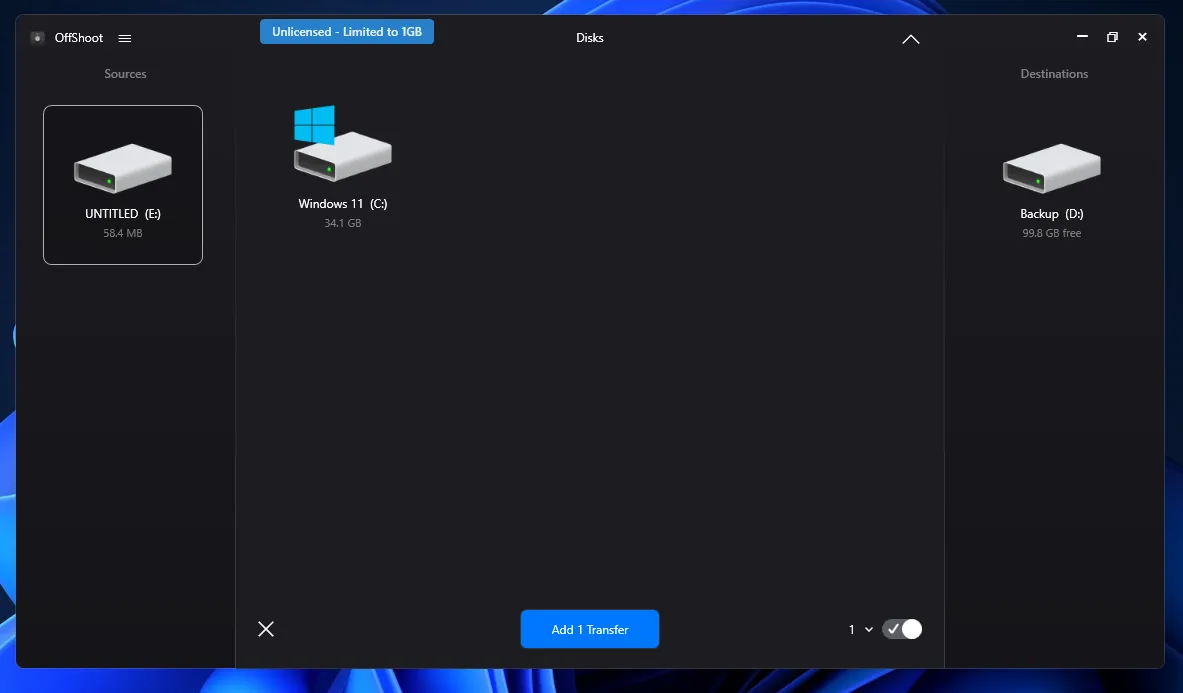
This tool allows you to perform a basic photo sorting. The program will automatically organize photos into folders based on their creation date and rename them according to specified criteria.

Several verification modes and checksum algorithms are available for copied data. The more stringent the settings, the more thorough the integrity check, but the copying process itself will be slower.

OffShoot is ideal for those looking to minimize manual operations and immediately organize their archive into a neat structure. Its flexibility allows you to adapt the settings to different use cases.
Tonfotos
If you need to not only copy photos from your camera or phone to an external hard drive but also organize them immediately, consider Tonfotos. Like OffShoot, the program can automatically catalog photos by date taken. Simply connect your phone or camera to your computer. The program will automatically detect the device and prompt you to copy.

If you install a mobile application on your phone TonfotosSync you can copy photos to a shared photo archive without a cable. The only requirement is that the smartphone and computer with Tonfotos installed must be on the same local network. This can be either Mash or a connection to a shared router. It doesn't matter whether the computer is connected via WiFi or LAN.
To start synchronization, click on File and Smartphone connection and scan the QR code using TonfotosSync.

Once connected, the mobile app will scan your phone's gallery and prompt you to sync. Only photos that aren't in the shared photo archive on your computer will be copied.

As a result, you receive a ready-made archive library with powerful organizational functionality.
Intelligent search and face recognition. Tonfotos automatically scans your library and groups photos of the same people. Simply enter a person's name once, and the app will automatically find them in all other photos, even if they were taken several years apart. This turns a chaotic collection of folders into a structured family archive.
Visual travel map. If photos contain GPS tags, Tonfotos automatically organizes them on a map. This allows you to instantly find vacation photos from a specific city or country, regardless of the folder they're stored in.
Convenient timeline. Your entire photo archive is organized into a single timeline. You can quickly navigate between years and months, which is especially useful when your library grows to hundreds of thousands of photos. The program works very quickly, even with huge databases located on external hard drives.
With Tonfotos, you can turn a stash of files on your external drive into a live, easy-to-view photo chronicle.
TeraCopy
TeraCopy is suitable if the functionality of Tonfotos and OffShoot seems excessive and you need a simple tool for reliable copying. The program serves as an alternative to the standard File Explorer and is especially useful for transferring large photo archives to an external drive.

The tool uses checksum (CRC) algorithms to ensure the file was transferred without errors. Detailed process information is displayed, including data transfer speed, a list of files, and possible errors. If the program detects a problematic file, it doesn't abort the entire process but offers to skip it and continue copying the remaining data.

When transferring large volumes of photos, TeraCopy demonstrates more consistent copy speeds compared to standard Windows tools. The difference is especially noticeable when working with thousands of small files—a typical situation for photo archives.
Monitoring the health of an external drive
Despite manufacturers' promises, any storage device has a limited lifespan. SSD memory is subject to cell degradation, and HDD mechanics are subject to physical wear. The only way to ensure the safety of your photo archive is regular monitoring.
However, a standard S.M.A.R.T. check is often insufficient. To avoid failures that could lead to the loss of valuable data, a comprehensive audit should be performed, including a surface test for bad sectors and a content analysis.
DiskGenius
DiskGenius is a comprehensive suite of tools for diagnosing the health of an external hard drive. Its capabilities extend far beyond simply reading SMART data.

The Verify or Repair Bad Sectors feature not only finds problem areas on your HDD, but also "blocks" them so the operating system no longer attempts to write important images there. And if your drive starts to fail, DiskGenius allows you to create a sector-by-sector copy (clone) to a healthy drive, thereby saving your valuable photo archive.
The app also works with SSDs. DiskGenius deciphers readings even for the latest NVMe drives, warning about critical wear percentages (Available Spare).
Macrorit Disk Scanner
Unlike the universal DiskGenius, Macrorit Disk Scanner is a highly specialized utility designed to check every square millimeter of your disk.

The program's interface is as simple as possible. The entire drive's capacity is displayed as a grid. Green squares indicate everything is fine, while red ones indicate it's time to consider a new drive. The program is optimized for working with external drives via USB 3.2 and USB4, ensuring the highest possible scanning speed.
It is worth noting that Macrorit operates in read-only mode, which eliminates accidental data corruption during the test.
WinDirStat
Disk health isn't just about physical integrity, it's also about data organization. WinDirStat helps you understand what's hogging your disk space and whether it's time to clean it up.

The program generates a "tree" where each file is represented by a colored rectangle. You'll immediately see that 40% of the disk is taken up by forgotten video backups or a huge graphics editor cache. The larger the rectangle, the more space the file or folder takes up. This is the easiest way to understand why a 4 terabyte drive is suddenly running out of space.
Conclusion
Photo storage isn't a one-time decision, but a long-term strategy. Archive reliability is determined not so much by the choice of a single drive model, but by a systematic approach to data management. The optimal solution is a combination of multiple storage devices and regular backup updates, rather than relying on a single device.
Experience shows that it's best to think of valuable photo archives as a "living system" requiring periodic maintenance: checking the drives' condition, updating backups, and revising the storage structure. This approach not only preserves the technical integrity of the files but also ensures quick access to the necessary images years later.
Plan your photo storage for the future, not just for the current storage capacity. A little effort today can significantly reduce the risk of losing memories and make your photo archive truly long-lasting and convenient.