What types of photo organizer apps are there for Android or iOS, and how do you choose one?
Updated: December 23, 2025 Author: Vitaly
Tired of a cluttered gallery? Read this article to find the best photo management apps for Android and iOS. You'll also learn how to organize your photo archive when using mixed devices (for example, iOS and Windows PC), where mobile solutions alone aren't enough.
In the era of film photography, every frame had a physical and economic value, but in today's digital world, photos taken with a phone have virtually no cost. This has led to users' photo galleries becoming chaotic dumps containing tens of thousands of images. These include not only photos of precious family moments, but also random screenshots, duplicates, meter readings, and botched selfies.
Of course, manually deleting all junk images is practically impossible. The good news is that mobile photo apps are evolving in line with user needs. Just five years ago, they were limited to viewers, but by 2025, the focus has shifted toward digital asset management solutions.
Modern mobile photo managers can not only display content, but also structure it and ensure privacy in the face of widespread data collection by tech giants.
The problem is that not all of them are created equal. This is due to functional and technical limitations. What works perfectly on Android may not work on iPhone, and vice versa. In this article, we'll explore how to clear out digital clutter and which tools are best for this purpose.
What tasks should a photo organization app solve?
The default photo management apps offered by Google and Apple on their devices offer extensive functionality, but they are designed primarily to promote the companies' paid services rather than to provide a better user experience. This is especially true when it comes to cloud storage limitations, as all of these apps' features rely on Google and Apple server algorithms. Consequently, you won't be able to manage your photo archive on your phone if it's larger than the available cloud storage.
Furthermore, using Google Photos or Apple Photos comes with certain privacy risks. Photos are sent to an unknown destination, and there's no guarantee they won't be used, for example, to train AI or advertising algorithms.
Therefore, when choosing third-party photo management apps, it is important that they are secure and have the following features:
- Smart search. It's impossible to remember a specific date for an event. The ideal app lets you search for "dog," "beach," or "passport," and the local AI will automatically find the right photos, even if you haven't captioned them. And all this without sending them to the cloud.
- Quick cleaning. Help with removing bad shots. It's important to keep the process simple and straightforward so cleaning doesn't feel like a second chore.
- Automatic duplicate detection. The app should automatically detect a series of 10 identical photos and suggest keeping only the best one, removing blurry and closed eyes.
- Working with dates. Often, when downloading photos from messaging apps (WhatsApp, Telegram), the dates get lost, and a photo from 2015 ends up in the "Today" folder. A good organizer makes it easy to change the shooting date to restore the chronology.
- Visibility (Map and Calendar). See all your travels as dots on a world map or view a calendar grid to remember what you did on this day a year ago.
It's worth noting that the points presented here are intended to describe the ideal app for organizing photos on a phone. However, there are some apps in this review that strive for this goal.
Photo Organizer Apps for iOS
iOS has a strict policy that significantly limits third-party apps' access to internal file system files. They can only interact with the central system photo library database, not the photo files themselves. When a user "moves" a photo to an album within a third-party app, the file physically remains in the shared storage, and the organizer only assigns a meta tag indicating its membership in a specific collection.
This creates some difficulties for users accustomed to desktop file management. If a third-party photo management app doesn't use its own local storage, deleting a photo from the shared feed within Photos will also delete it from all albums.
But even with such strict restrictions, there are functional and convenient solutions that will help you get things in order.
HashPhotos
This is perhaps the most well-known third-party photo organizer for iOS. If Apple's default Photos app seems too simplistic, HashPhotos is the tool that will transform your gallery chaos into a structured archive.
Unlike the standard Photos organizer, this one focuses on functionality rather than aesthetics. You can change thumbnail size (from huge to tiny), line spacing, and metadata display directly in the previews; group photos by date (day, month, year), location, or format (RAW, PNG, Video). All functions are controlled via a convenient sidebar, which is always at hand, no matter which folder or album you're in.
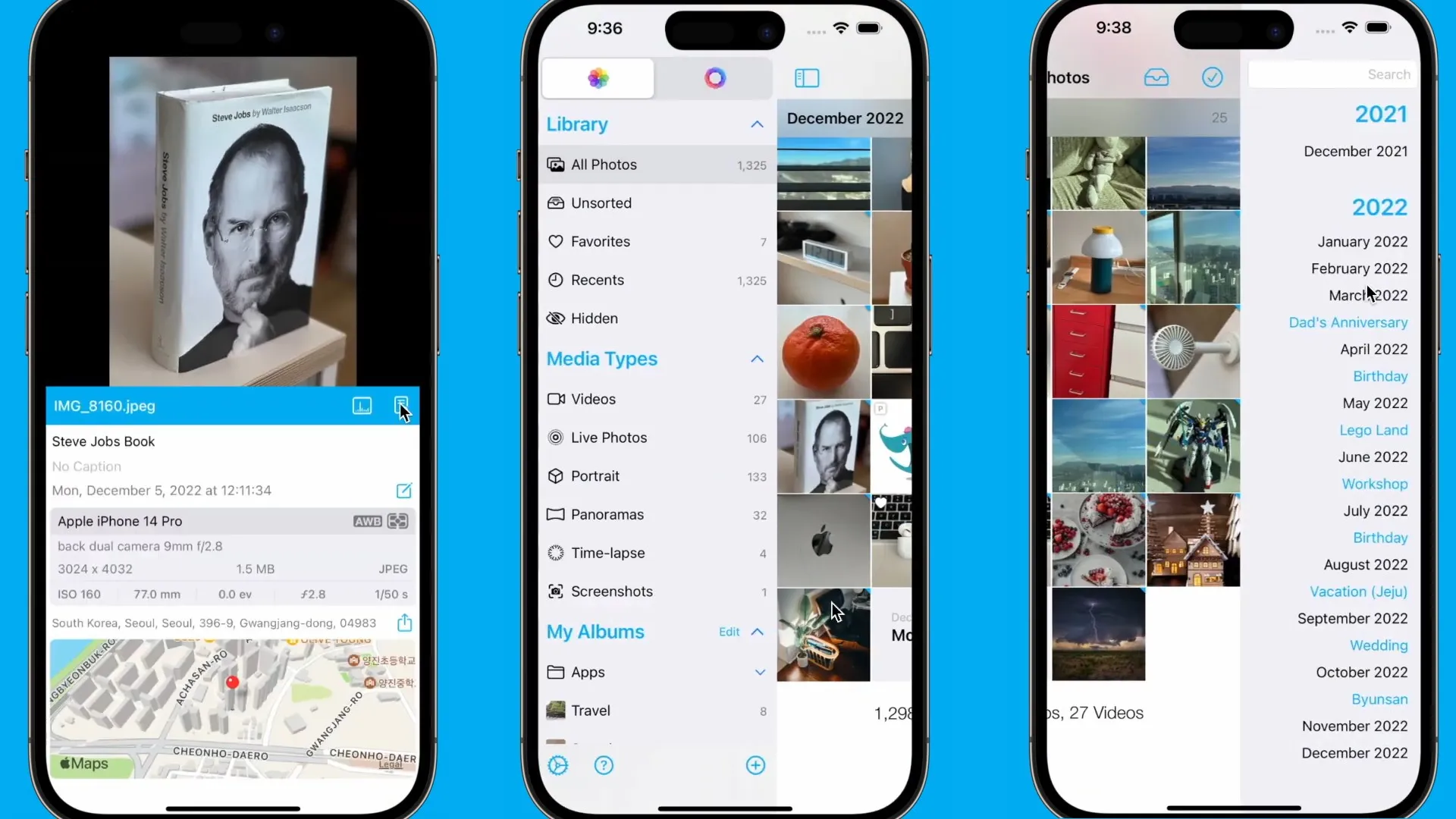
A particularly useful metadata editing feature allows you to view detailed technical specifications and shooting parameters (camera, ISO, shutter speed, histogram), edit the date and time (including batch editing for multiple photos), and change or remove geolocation to preserve privacy.
The app has its own tag library, making it easy to search without having to clutter up your albums. For example, you can quickly find all photos tagged "Checks" or "Design."
HashPhotos is also effective at combating duplicates. Its built-in algorithm finds identical or very similar photos. The photo comparison mode allows you to choose the best photo.
Benefits of HashPhotos
- Deep metadata management. The app allows you to view and edit EXIF data in detail.
- Convenient visual organization of the archive. You can change the preview size, grid density, and enable the display of service information directly in the gallery.
- A powerful tagging system. Provides logical classification of photos without creating dozens of albums.
- Duplicate search. It can find both exact copies and visually similar photos. Comparison mode simplifies selection.
Disadvantages of HashPhotos
- Lack of full-fledged content search. The app doesn't offer semantic search for objects using built-in machine learning, as is implemented in Apple's Photos.
- Complex interface. Compared to a standard organizer, the app's functionality may seem excessive and overloaded, especially for those accustomed to the minimalist interface of proprietary apps.
- Free version limitations. Full access to all tools is only available after purchasing the Pro version.
Photo Manager Pro
Photo Manager Pro is a photo organization app for iOS, designed for those who prefer traditional folder management. Here, you can copy and move photos and videos into folders and subfolders, sort them by date, name, or type, and manually reorder them by simply dragging and dropping thumbnails.
It's like a computer explorer specifically tailored for working with photos, with advanced folder customization features. For example, you can choose a color or any image as a catalog cover. These simple actions speed up navigation and make photo management visually pleasing.
Photo Manager Pro offers powerful tools for working with metadata and cataloging. For example, each photo can be assigned a star rating and accompanied by a text description.
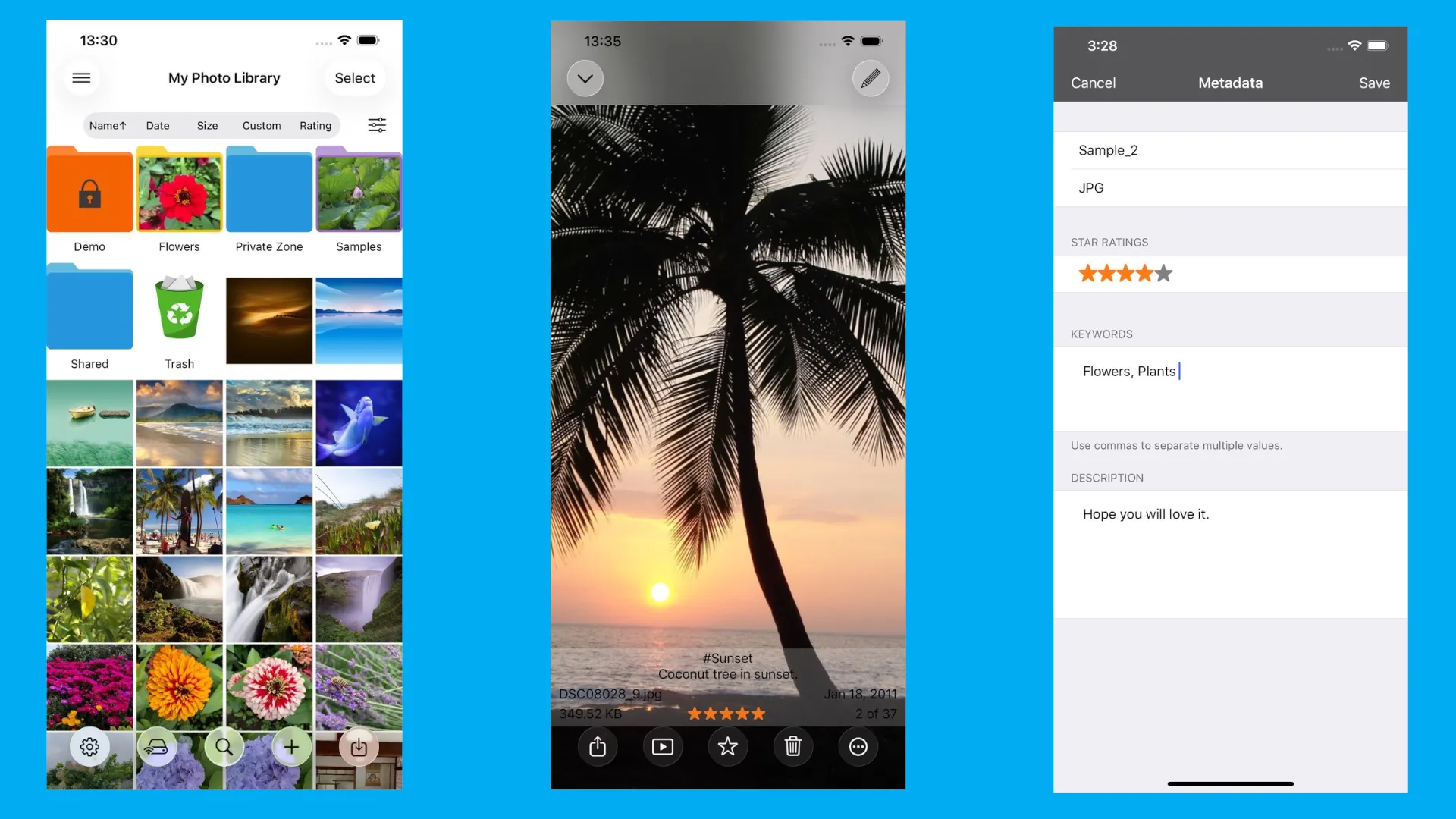
The app offers various data transfer options. It has a built-in FTP server, allowing you to exchange photos between your computer and iPhone using a regular browser or FTP client. Direct integration with third-party cloud storage services is also available: Dropbox, OneDrive, and Box.
Benefits of Photo Manager Pro
- Format support. The app can open not only JPG and PNG, but also RAW formats, including those taken on devices other than the iPhone.
- Flexible data transfer. Built-in HTTP and FTP servers are an excellent solution for transferring photos for those who don't want to rely on iCloud or cables.
- Working with metadata. The ability to set ratings and write descriptions helps you quickly find the best shots in huge collections.
Disadvantages of Photo Manager Pro
- Photo duplication. When importing photos from the standard iOS photo library into Photo Manager Pro, the files are copied. This can quickly fill up your device's memory if you don't delete the originals from the system app.
- Lack of smart search. The app doesn't support contextual search, only file names and manually added descriptions.
- No facial recognition. Unlike modern organizers, there's no automatic grouping of photos by the people in them.
Photo Organizer: Picnic
Picnic is a photo organizer that works somewhat differently from previous apps and from the generally accepted concept of similar programs. Instead of an endless grid of thumbnails, you view each photo full-screen. Swipe right to save, swipe left to trash (archive). This playful format allows you to sort through hundreds of photos accumulated over the course of a day or week in just a few minutes.
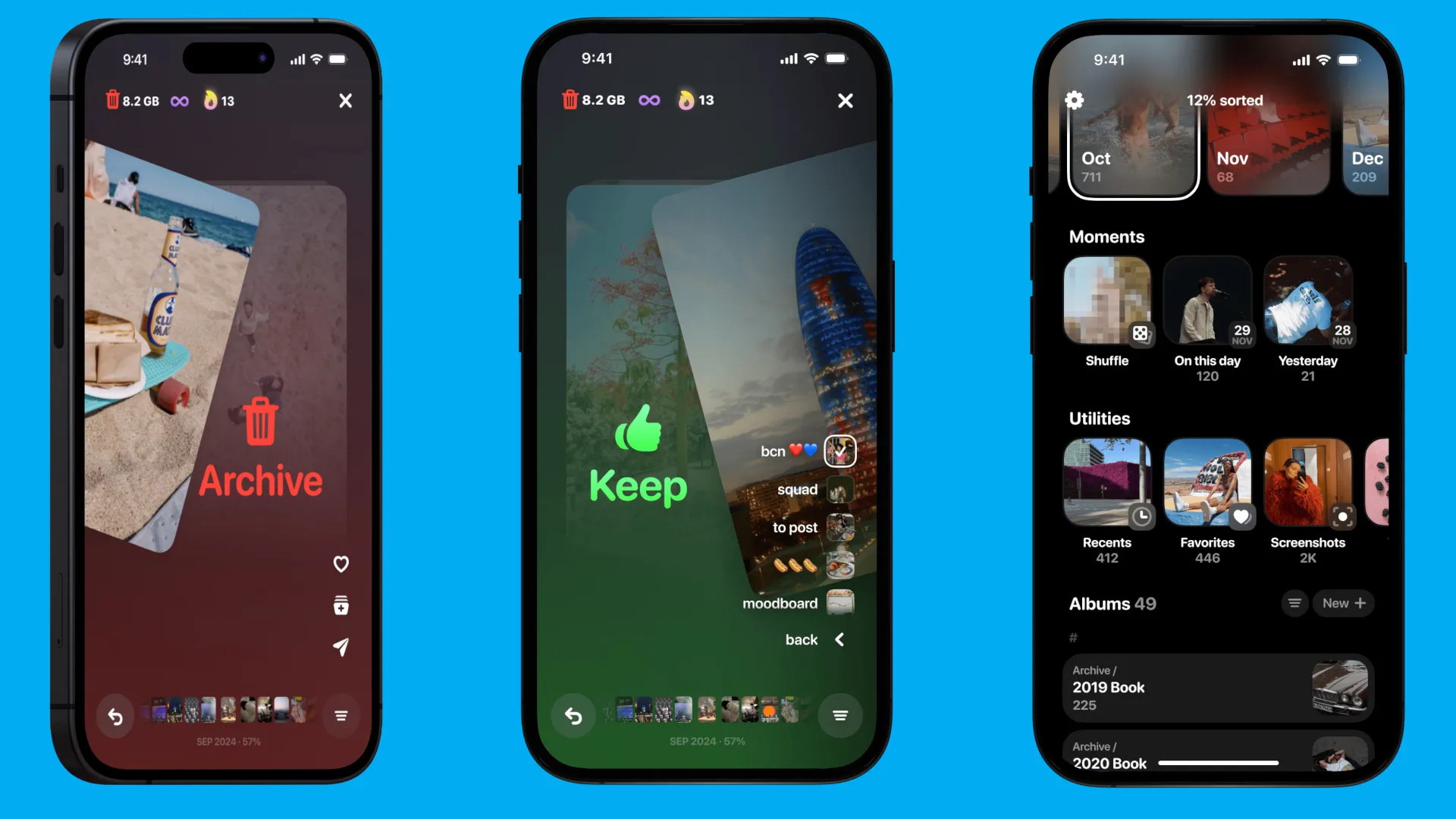
Beyond the simple delete/keep sorting, Picnic lets you organize photos into albums with the same quick gestures and compare similar shots in a special smart mode to choose the best one from a series.
Benefits of Picnic
- Easy sorting. The swipe mechanic makes tidying up your phone easy and even exciting. Organizing photos becomes a fun game.
- Comparison mode. Allows you to display similar shots side by side to instantly identify the sharper or better shot.
- Reminder system. The app encourages regular cleaning, helping you stay organized and turning phone storage management into a healthy habit.
Disadvantages of Picnic
- Free version limits. The free version allows you to sort only 250 photos per day. Unlimited use and album access requires a paid subscription.
- Narrow focus. The app is great for cleaning and basic sorting, but it lacks in-depth EXIF data editing tools.
- Lack of semantic search. Like many local solutions, Picnic doesn't support photo searches for "dog" or "food." The emphasis is on visually browsing the content.
PhotoGem
Like Picnic, this iOS photo organization app is noticeably different from traditional galleries and photo managers. PhotoGem focuses not on sorting photos into albums or adding thematic tags, but on geolocation: where, when, and in what environment the photo was taken.
PhotoGem is built around maps. Photos can be viewed not only as a grid, but also by georeferencing specific points on the map. Various display modes are available, including 2D and 3D visualization, allowing you to literally "travel" through your photo archive.
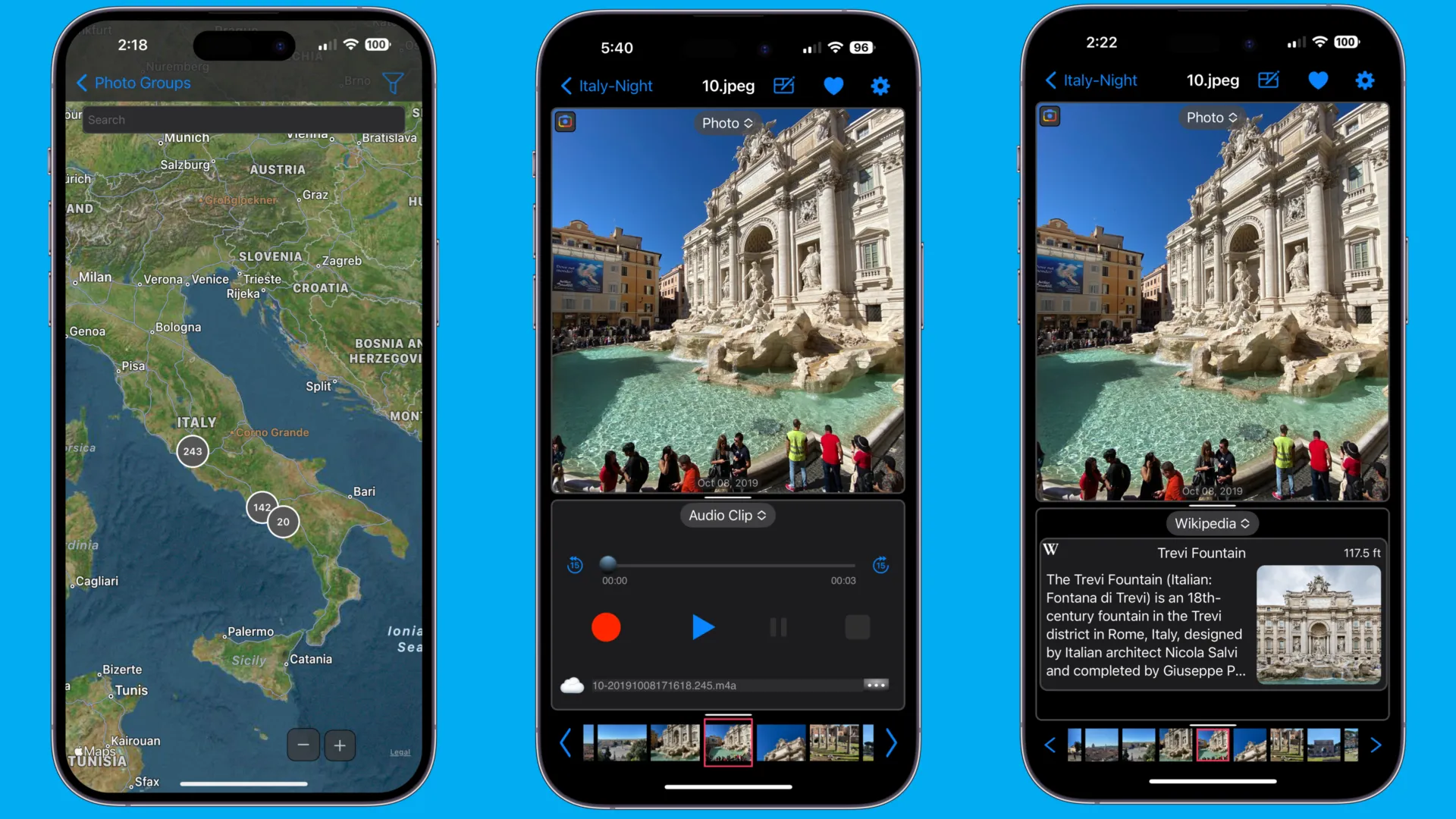
Of particular note is the inclusion of a contextual panel with additional information about the location where the photo was taken. PhotoGem analyzes the GPS coordinates of the photo and retrieves related geographic information, including Wikipedia articles, landmarks, and nearby landmarks. The photo becomes more than just a static image, but an interactive source of additional information about the place you visited.
If a photo doesn't have a location tag, you can add one directly to PhotoGem, which is especially useful for photos received from instant messaging apps or old archives where coordinates are missing or incorrect.
An interesting feature is audio notes. You can add a voice comment to each photo, which will play when you open it. This can be useful for personal journaling, travel notes, or documenting work projects.
PhotoGem Benefits
- Working with maps and geolocation. View photos linked to their actual locations, including 3D maps.
- Context from Wikipedia. Automatically downloads information about landmarks and objects near the shooting location.
- Editing metadata. Ability to change the date, time, and GPS coordinates of photos.
- Audio notes. Add voice comments to individual photos.
- No file duplication. The app works with your system media library without copying photos.
PhotoGem's Disadvantages
- Narrowly focused. The app is poorly suited for bulk gallery cleaning or dealing with duplicates.
- There's no semantic search. You can't find photos for queries like "cat" or "beach."
- Location dependence. Without GPS data, most key features become meaningless.
- Unusual usage scenario. For users expecting a classic organizer with albums and tags, the interface may seem strange.
RAW Power and Nitro
RAW Power and Nitro by Gentlemen Coders are an example of what Lightroom might look like if it were designed from the ground up for mobile devices and without the mandatory cloud connection. Both apps run locally, without forced syncing with the developer's servers. They directly access the iOS system photo library and can also work with files via Files.app. This means photos are never copied or duplicated, and all edits are stored as metadata directly within the file.
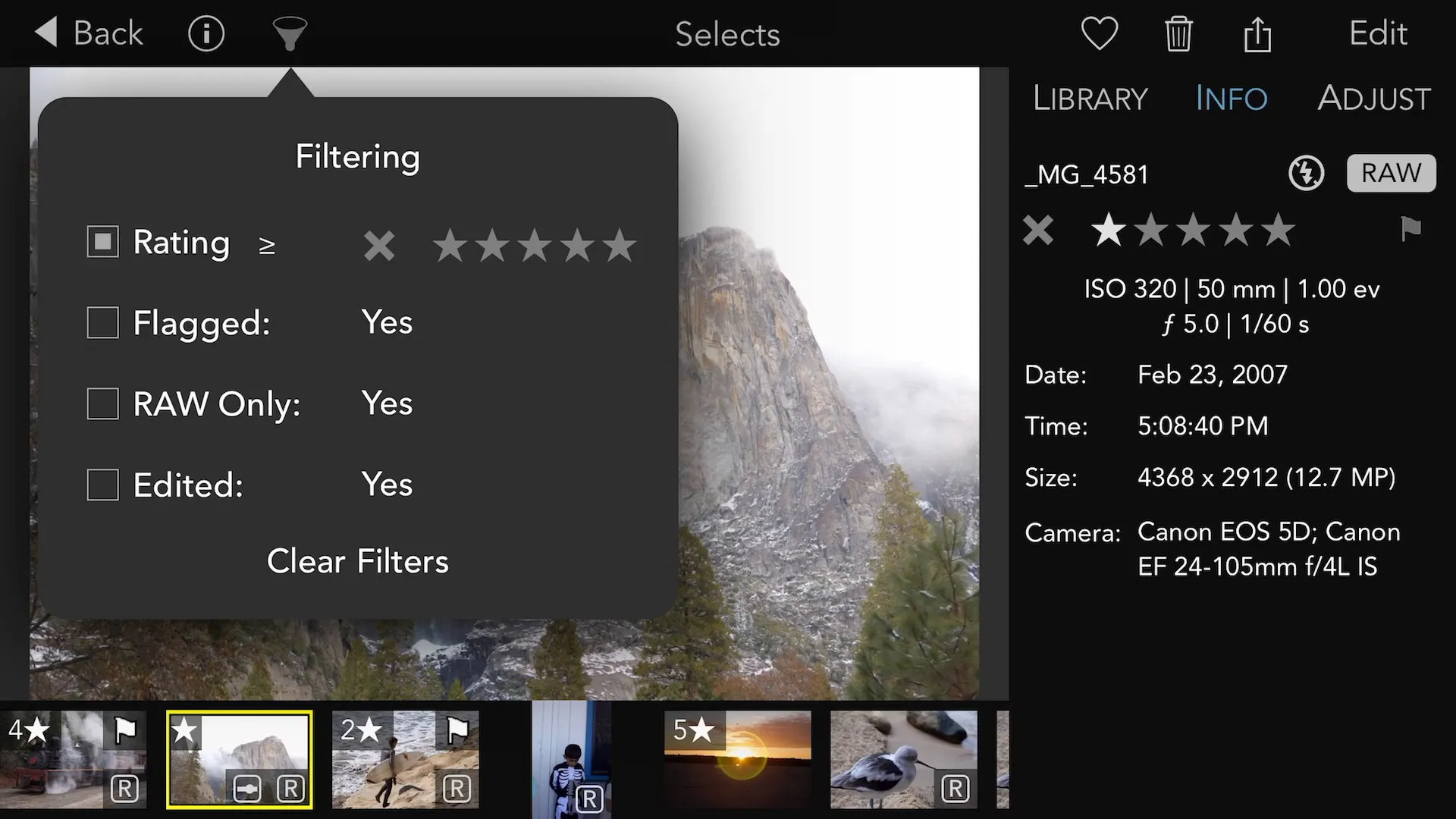
In terms of functionality, RAW Power can be considered a basic app, aimed at casual users who simply want to organize their photo archive and perhaps make minor adjustments. Various sorting options are available: by rating, flags, date, camera, or format. The app also allows you to view and analyze technical parameters of your photos, such as exposure, ISO, histogram, and other EXIF data.
RAW Power is a powerful tool for navigating through a large archive, where hundreds or thousands of images need to be quickly sorted, selected, and prepared for further work.
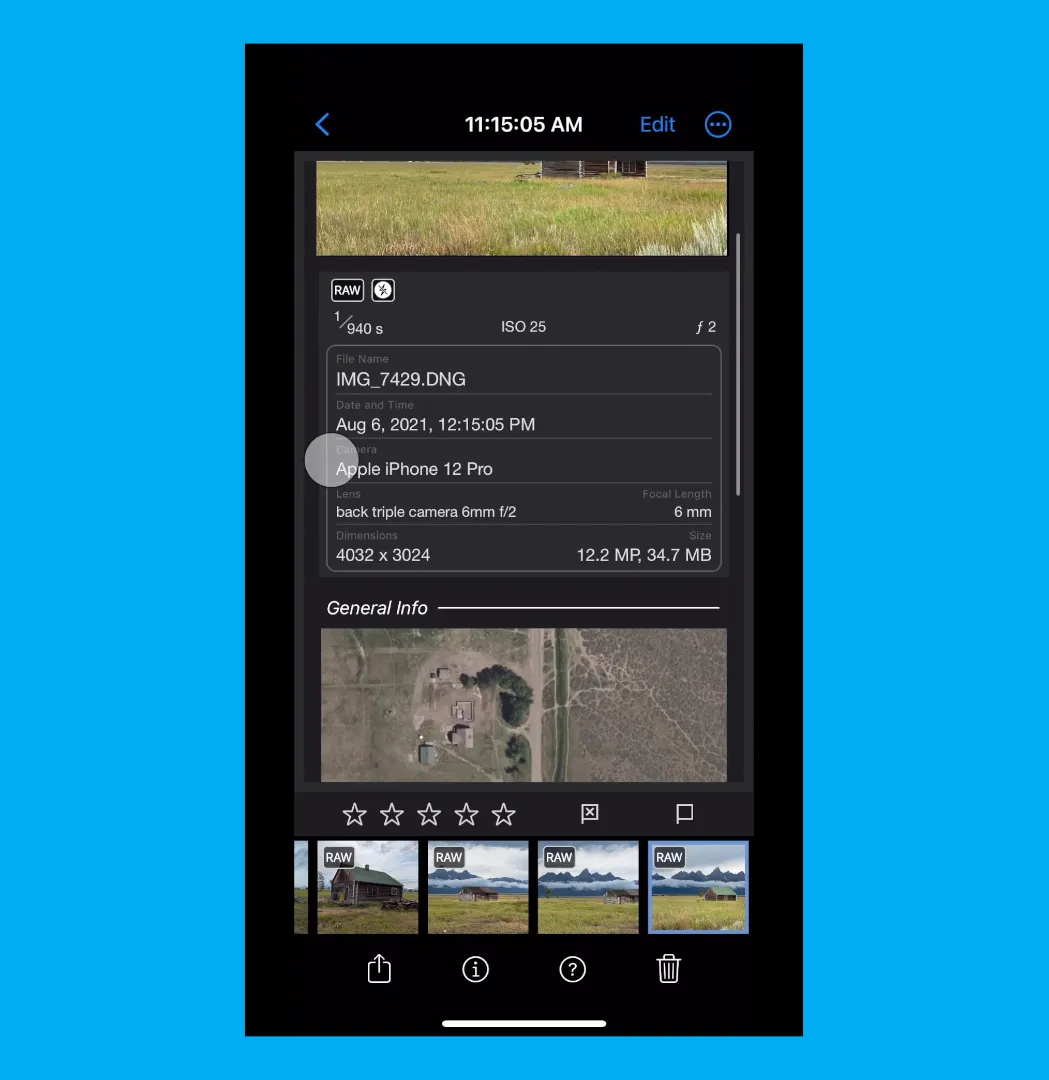
Nitro isn't just a pricier version of RAW Power, but a standalone, higher-end product designed for advanced users and photographers. It offers features and tools rarely found in mobile apps:
- masks, brushes and gradients for spot correction;
- advanced work with metadata and keywords;
- XMP file support for compatibility with desktop programs;
- smart collections and advanced filtering.
Nitro effectively combines the capabilities of an editor and a cataloger, allowing the user to go all the way from importing RAW files to final export directly on the iPhone.
Benefits of RAW Power and Nitro
- Professional photo editing. Both apps offer extensive RAW format support and professional editing tools right on your phone.
- Photo organization features. You can filter, sort, and tag images (rating, flags, keywords), which is especially useful when processing large photo archives.
- There's no cloud connection. The apps run locally, increasing privacy and eliminating the need to transfer photos to third-party servers.
Disadvantages of RAW Power and Nitro
- Complexity for beginners. Due to the variety of functions, the application interface may seem overloaded or confusing to a non-technical user.
- Performance and memory requirements. Editing large RAW files and batch processing require a lot of device resources, which can lead to slowdowns or overheating.
- There's no contextual search. The built-in AI algorithms are focused on processing photos, not on implementing content-based search capabilities.
Photo Organizing Apps for Android
Unlike iOS, Android has historically provided more direct access to the file system. Apps can perform file manager-level operations, physically moving bytes of data from the /DCIM/Camera folder. This allows for the creation of complex hierarchical structures of nested folders that can be read by any other file manager or when connected to a PC.
However, direct access to files doesn't mean photo management apps for Android are more functional and convenient. Let's look at examples of photo managers that are truly worth your attention.
Slidebox – Photo Cleaner
While Picnic brings swiping photo organization to iOS, Slidebox brings this idea to Android (although an iOS version also exists). This app is perfect for those who don't want to fiddle with settings or create tags, but want to quickly turn a collection of thousands of photos into a neat library.
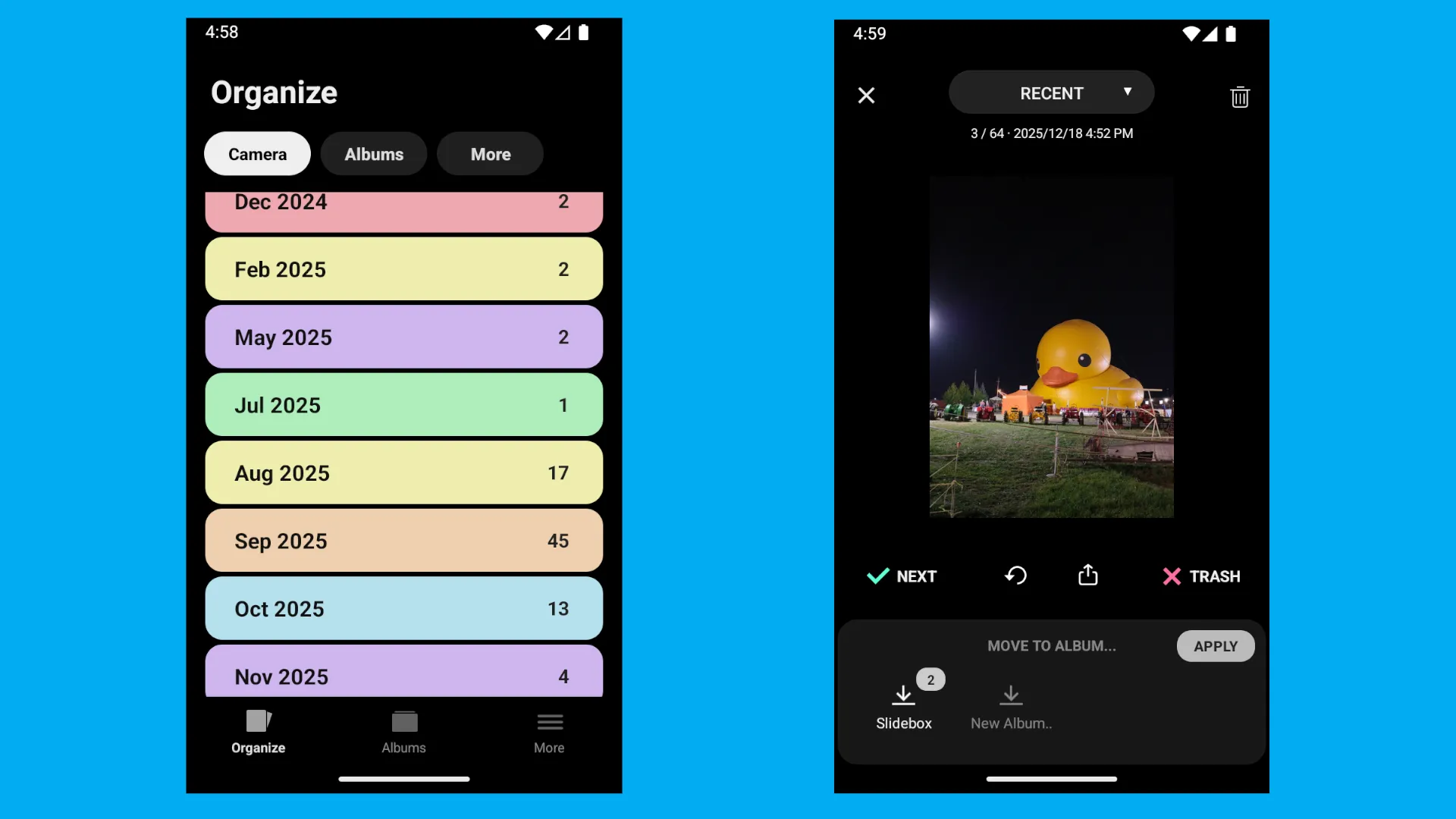
Sorting photos in Slidebox is as simple as scrolling through your social media feed. The app displays photos full-screen, and you manage them with intuitive gestures.
- Swipe right. Instantly sends the photo to the trash.
- Tapping an album. At the bottom of the screen are the buttons for your albums. One tap, and the photo is moved to the desired category.
- Swipe left. Quickly skip a frame if you haven't decided what to do with it yet.
Please note that the app works directly with the system gallery. If you move a photo to the "Vacation" album within Slidebox, it will physically move to the corresponding folder on your phone's memory. The same happens when you delete a photo, but the photos aren't immediately deleted; they're moved to the app's trash bin, from where they can be restored.
Slidebox Benefits
- Speed and ergonomics. The interface is designed so you can clean the gallery with one hand.
- Direct synchronization. All changes (deleting, sorting) are instantly reflected in the Android system file explorer.
- Safe deletion. Photos don't disappear forever, but are moved to the Recycle Bin. One click of the "Undo" button returns them to their original location.
- No duplicates. The app doesn't copy files to its internal storage, saving space on your device.
Disadvantages of Slidebox
- There's no metadata support. The app doesn't have advanced tools for editing EXIF data (date or geolocation). The focus is entirely on sorting.
- Ads. The free Android version includes ads between photo sequences, which somewhat slows down the user experience.
F-Stop Media Gallery
This photo organization app is slightly different in that it features deep integration with photo metadata. Moreover, F-Stop can read not only its own tags but also those created by third-party programs, such as Lightroom.
This makes the app especially convenient for mixed usage scenarios, such as using an Android smartphone and a computer. You can assign tags and ratings on your phone and then continue working on your PC without losing your metadata changes.
The entire app interface is built around a pull-out sidebar that provides instant access to all filtering methods. It's designed more for practicality than visual appeal.
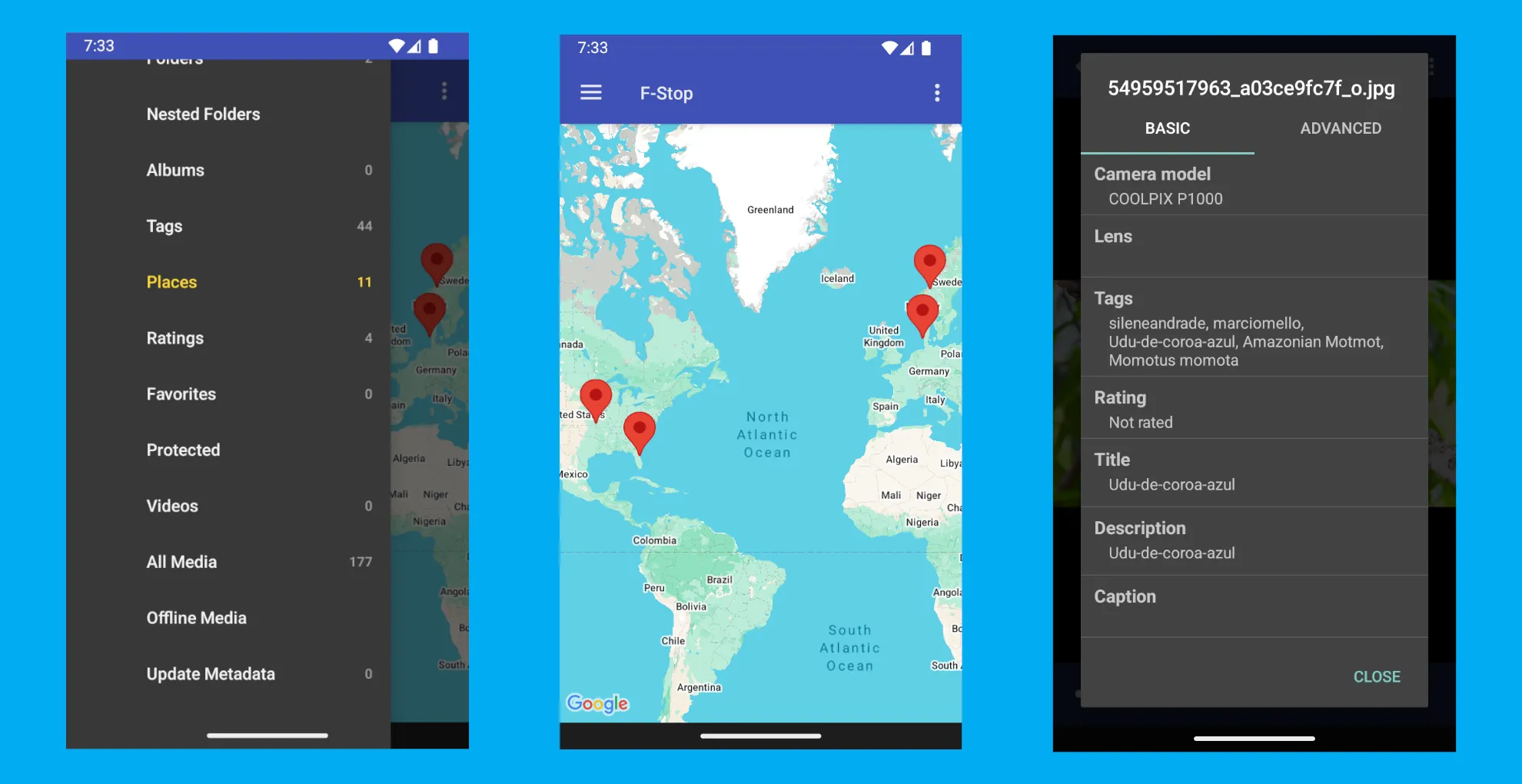
This app has an interesting feature called "Offline Media." It means that if files become temporarily unavailable (due to removing the SD card or connecting the device to a PC), F-Stop doesn't delete their organization data. These files are marked as "offline" but retain all tags and ratings until they reappear in the system.
Benefits of F-Stop Media Gallery
- Professional metadata management. Read and write tags/ratings directly to image files.
- Powerful automation. Smart albums save hours of manual sorting.
- Performance. The app is well optimized and runs quickly, even when managing large photo collections accumulated on your phone over the years.
- Full control. Ability to include or exclude specific folders from media library scanning.
Disadvantages of F-Stop Media Gallery
- Limitations of the free version. Important tools like nested folders and logging file changes are only available in the paid Pro version.
- Design. Visually, the app looks too austere, losing out on aesthetics to more modern and minimalist galleries.
Gallery by IacobIonut
Gallery is an innovative open-source photo viewing and organization tool for Android, available for free download from the F-Droid store. Despite being developed by just one person, it's a truly convenient and effective way to organize your photos.
The Gallery interface is designed in accordance with the Material Design 3 concept and can dynamically adapt to the color scheme of your wallpaper (the Material You feature), creating a sense of unity with the entire Android 12 system and above.
Despite its visual simplicity, underneath the hood lies a powerful algorithm that automatically indexes all added photos and assigns them appropriate tags based on context. This not only makes browsing more informative but also simplifies the search process. Simply enter the name of an object that might be in the photo.
The tags generated by the application also form the basis for thematic catalogs, including those with images of people.
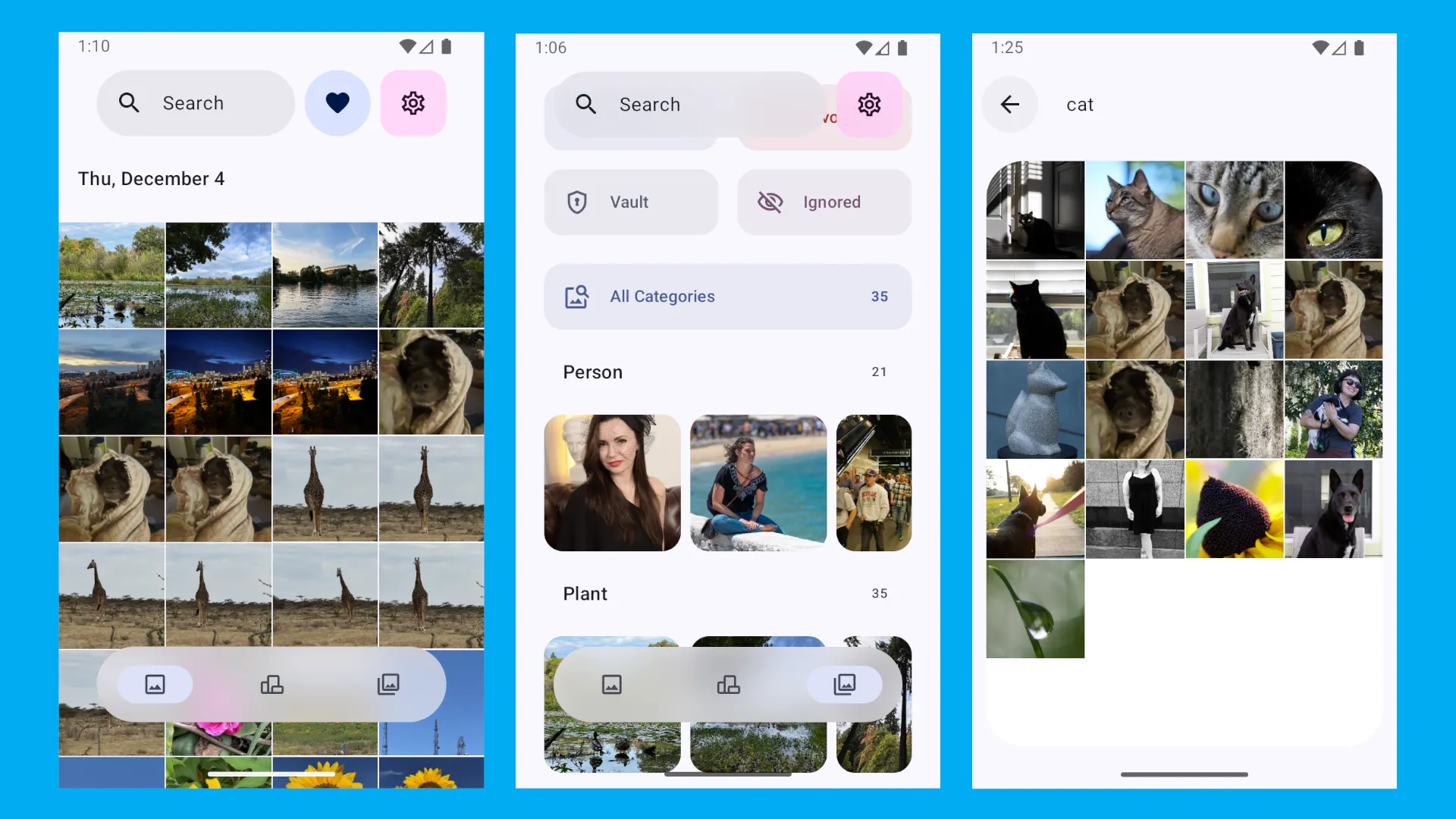
If you feel like the automatic photo organization isn't quite up to par, you can add tags or create your own themed albums in Gallery.
Gallery Benefits
- Privacy and openness. The app is open-source and distributed through the F-Droid repository, eliminating hidden trackers or the transfer of your photos to third-party servers.
- A modern technology stack. Thanks to Jetpack Compose, the interface runs smoothly even on mid-range devices.
- Flexible album management. You can pin your favorite folders to the top of the list and sort them by date or tags.
- Built-in Recycle Bin. Manage deleted items from a single screen, protecting yourself from accidentally losing important footage.
Disadvantages of Gallery
- Initial indexing load. Since object and face recognition occurs locally on the device (to ensure privacy), the initial scan of a large media library can take a significant amount of time.
- Accuracy of local algorithms. While the built-in AI performs well with basic categories, its accuracy in recognizing specific objects is inferior to cloud-based giants like Google Photos.
- Lack of advanced metadata editing. Despite the presence of searchable tags, the app lacks tools for in-depth manual editing of EXIF technical data (such as adjusting GPS coordinates or shooting parameters), as is available in professional photo organizers.
Aves Libre
Like the previous example, Aves Libre is also an open-source photo organization app developed by a hobbyist. However, here the author aims to provide professional cataloging solutions, not just convenient browsing.
Aves Libre is uniquely versatile. The app easily handles both traditional JPEG and more exotic formats, such as vector SVG or GeoTIFF. Aves Libre automatically identifies panoramas (photospheres), 360° videos, and live photos, providing appropriate viewing tools for each type of content.
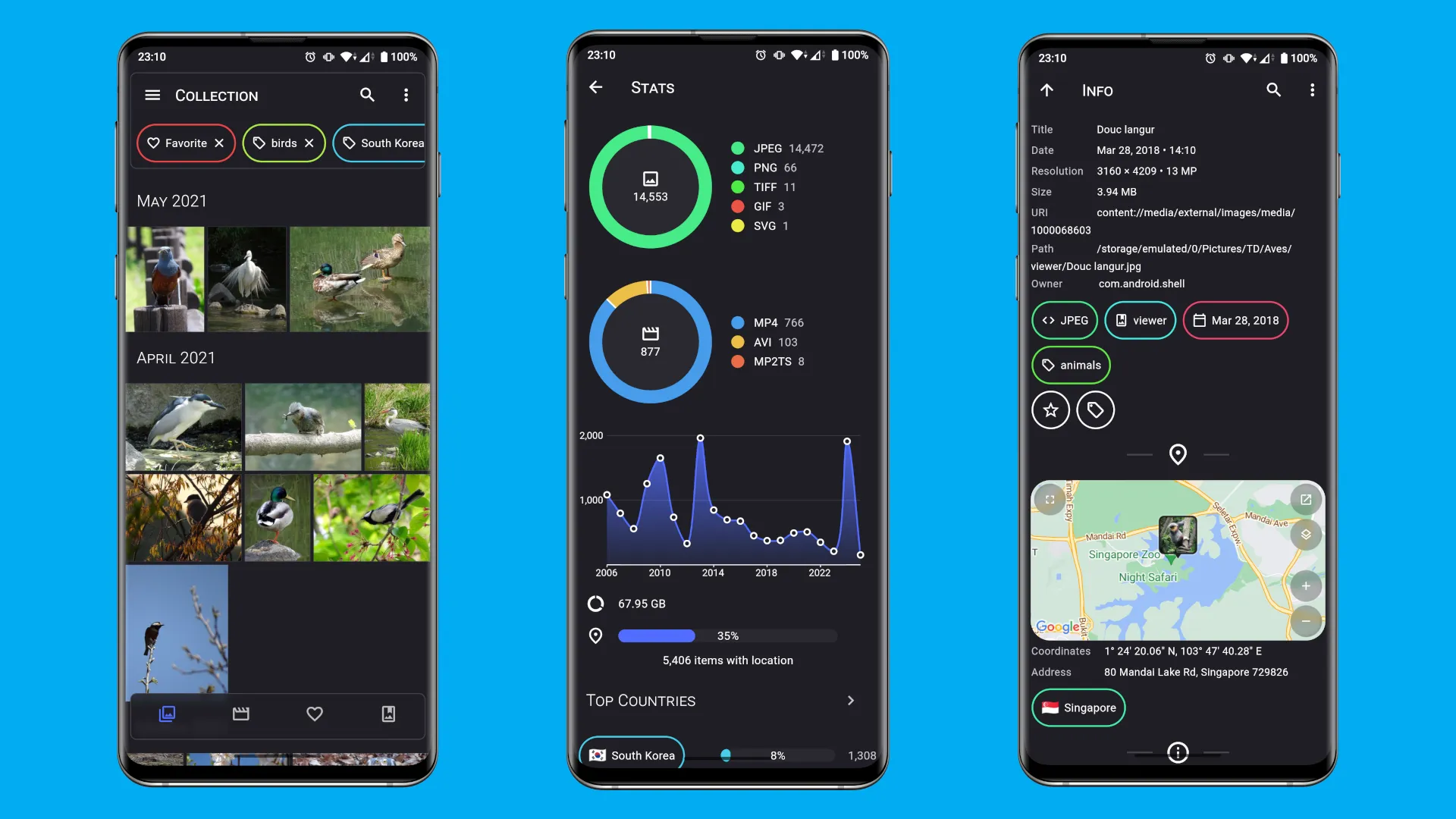
The interface is designed for seamless navigation. With one click, you can go from viewing a specific photo to viewing a map of the location, then to a tag cloud or detailed statistics about your collection. The app is deeply integrated into the Android ecosystem: it supports widgets, app shortcuts, and even has a version for Android TV.
Particular attention is paid to geography. Using location data, Aves doesn't just place a point on the map, but also groups your photos by country and city using reverse geocoding. This allows you to find all the shots from a specific trip in just a second, even if they're scattered across different folders.
Benefits of Aves Libre
- Support for exotic formats. The ability to work with files that other galleries simply cannot see.
- Deep metadata management. View comprehensive file information, from technical shooting parameters to detailed EXIF, IPTC, and XMP structure.
- Advanced statistics. The app creates visual graphs and reports for your media library, showing the cities and countries you've visited.
- Powerful search and filtering. The filter system allows you to combine criteria: for example, find "all 4K videos shot in Italy with a 35mm lens."
- System integration. Widgets, screensavers, and support for Android's global search make using the app as natural as possible.
Disadvantages of Aves Libre
- Permission requirements. To function properly (display maps, geocoding), the app requires network access and geolocation, which may not be suitable for those who prefer maximum data isolation.
- Interface complexity. The abundance of functions and nested menus can make the app feel overwhelming for users who simply want to "view photos."
- Scanning resource consumption. Thoroughly analyzing the entire collection's metadata during the first run requires time and computing power, especially for large archives.
A Cross-Platform Photo Organizing Strategy
Storing photos solely on your phone is a big risk. It can get lost or drown. Besides, many of us have multiple devices: an Android phone, an iPad, and a Windows computer. And every family member might have one. How do you link them together?
At first glance, it might seem like the only solution is to buy a cloud subscription and sync all your home devices. The problem is, over time, the number of photos doesn't decrease, but only increases. This means the cloud storage purchased six months ago is no longer sufficient, requiring you to upgrade to a more expensive plan.
However, there's another option, perhaps not as simple, but certainly cheaper in the long run: syncing photos from all devices to a second computer drive or an external storage device. However, simply copying photos to a folder is difficult to understand—it requires a system that's practically impossible to implement manually.
The Tonfotos photo management app solves the problem of transferring photos from your phone to your computer. Simply connect them with a cable, and the app automatically finds new photos, downloads them, and organizes them into folders (Year/Month).
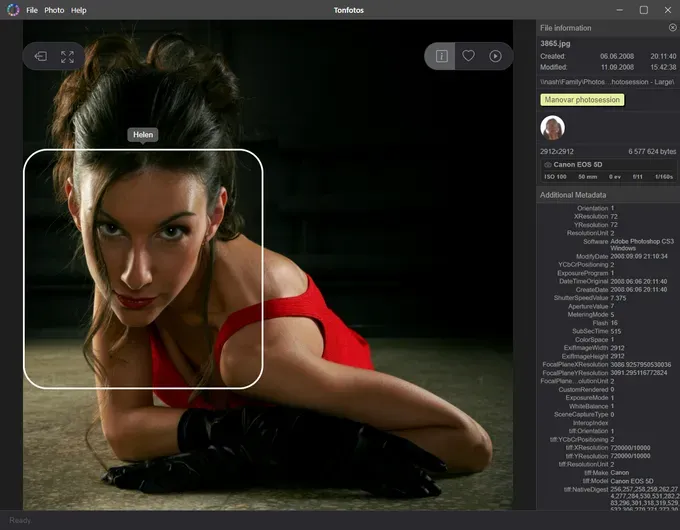
Tonfotos also has other useful features. For example, its built-in AI facial recognition algorithm can help you find all your relatives in gigabytes of archived data. This is a great way to free up your phone's memory while saving all your valuables to your computer.
Which app is right for you?
It's worth recognizing that choosing the ideal app depends not on the number of features, but on the current state of your photo archive and your ultimate goal. If your main problem is thousands of accumulated screenshots, duplicates, and blurry shots, don't jump straight to complex professional tools. Start with "cleaner apps" like Picnic or Slidebox. Their swiping game mechanics allow you to clear out years of clutter in a few short sessions, without turning routine into a chore.
For those who value a strict structure and quick search by specific parameters, managers with in-depth metadata processing are the best choice. For iPhone users, HashPhotos is the best solution for batch editing dates and creating a tag system. Android users should choose F-Stop Media Gallery. If you travel frequently and want to see your photos in context, choose Aves Libre or PhotoGem.
Professionals working with complex RAW formats are better off investing in specialized software like Nitro, which allows them to process photos directly in the system's media library, without creating unnecessary copies or cluttering up the device's memory with duplicates.
Remember that even the best mobile organizer is limited by your phone's storage. Use mobile apps for daily sorting and photo hygienics, but for long-term storage, move valuable archives to your computer. Pairing your smartphone with the Tonfotos app on your PC will allow you to create a unified family archive, where artificial intelligence will help you find loved ones by their faces, and physical files will be securely organized into folders.