Digital Album: How Modern Technologies Are Changing Photo Storage Culture
Updated: February 10, 2026 Author: Vitaly
This article addresses the issue of choosing solutions for storing and visually presenting digital photographs. It describes effective tools for creating digital photo albums for both family photo archives and professional photographers.
Surely, in your home or professional digital photo archive, there are some photos that deserve special attention. In the past, beautifully designed photo albums (portfolios) were created to showcase such photos. Depending on the local culture, these could be simple collections of the best shots or themed books dedicated to a specific event. The latter often included not only the photographs themselves but also illustrations and text notes.

The transformation of photographs from paper to digital format has changed the way we capture images and the very culture of preserving memories. In an era when smartphones and digital cameras generate an unprecedented volume of visual content, the concept of a "digital photo album" has evolved. It is not simply a collection of file folders, but a complex, multi-layered system that integrates hardware, cloud services, intelligent software, and new archiving methods.
The modern digital album is a dynamic environment that provides instant access, interactivity, and protection of personal history from the physical destruction that paper media are subject to.
The problem is that there's no single solution for creating digital photo albums, as they have different values for everyone. For families, it's a way to preserve the continuity of generations and share moments of children's growth with relatives in real time. For professional photographers, it's a critical tool for delivering the finished product to clients. For travelers, digital albums become interactive diaries, enriched with cartographic data and multimedia elements.
Ultimately, everyone has their own requirements for the ideal digital album. To choose the best option, it's important to understand the wide variety of options.
Classification of digital photo albums
The modern market offers a wide range of digital album creation tools, which can be categorized by several key characteristics: display method, level of automation, technical architecture, and intended purpose.
- Hardware photo frames. These are specialized displays that feature cyclic photo display, cloud synchronization, and can be equipped with motion sensors. This solution is ideal for families and seniors, and also makes a stylish digital interior element.
- Professional galleries. Online platforms for photographers. They facilitate content delivery and provide a convenient selection of images for clients. They often include tools for selling printed materials.
- Local managers. PC software that indexes files locally. Suitable for users who value privacy and need effective search without uploading data to the cloud.
Each of these digital photo album options has its own unique features. So, to help you make an informed choice, let's take a detailed look at each option and the tools available.
Digital photo frames
Like many portable devices, digital frames have come a long way from a simple LCD screen reading data from an SD card to an intelligent hub for the smart home. Modern devices feature thin, aesthetically pleasing panels that don't simply display images, but mimic the look of a printed photograph. This is made possible by matte finishes and high-resolution IPS panels.
Available in a wide range of sizes:
- Compact (7-8 inches). Ideal for bedside tables and desks, they are often used as budget gifts.
- Standard (10-11 inches). The most popular segment, offering a balance between detail and space.
- Large-format and interior panels (15-27 inches). Designed for wall mounting, they often serve as digital paintings.
It's worth noting that a digital photo frame isn't just a high-quality display; it also offers a whole range of additional options, the exact list of which depends on the model and manufacturer.
Aura frames
The company was founded in 2012 by former Twitter(X) employees. The first Aura device was unveiled in October 2016. Since then, the company has grown from a startup to one of the industry leaders, with a total funding of about $47 million.
Aura digital photo frames combine premium design with ease of use. Unlike competitors, the company doesn't require a subscription. You can upload unlimited photos and videos at no additional cost. The devices themselves boast an attractive appearance and excellent functionality.
- Shared access. Using the app, you can invite an unlimited number of family and friends to share their photos directly to your frame from anywhere in the world.
- Smart sorting. Built-in AI can find the best photos, avoiding duplicates and blurry shots. The "Smart Pairing" feature combines two similar vertical photos into one beautiful horizontal collage.
- Light sensor. The frame automatically turns off when the room gets dark.
- Video support. You can upload short videos with sound (built-in speakers).
It's worth noting that Aura digital photo frames don't have a touchscreen (to avoid fingerprints). They are controlled via a panel on the top edge of the frame, using swipes. Adding photos is done exclusively through the smartphone app (there's no web version) by uploading them to Aura's cloud storage.

Since the frame only displays photos uploaded to the cloud, it requires a constant internet connection via Wi-Fi, which may be difficult for older people to use.
Advantages
- No subscriptions. Unlimited cloud storage for photos and videos, free.
- Premium design. The lack of a touchscreen keeps the screen free of fingerprints.
- Smart features. AI automatically removes duplicates and creates collages.
Flaws
- Wi-Fi dependence. Without internet, the frame is practically useless.
- No web version. Control is only via the mobile app.
- Gesture controls. Swipes on the case may feel unusual.
Nixplay
While Aura Frames emphasizes premium minimalism, Nixplay prioritizes functionality. This is evident from the moment you unbox and turn on the brand's digital photo frame. All Nixplay models feature touchscreens and built-in motion sensors (the frame turns on when you enter the room).
They have a more advanced sharing system. You can create groups, subscribe to friends' playlists, and send photos to the frame via email (each device has its own unique email address). Nixplay also works seamlessly with Google Photos, Facebook, Instagram, and Dropbox.
The mobile app deserves special attention. It not only allows you to send photos to the frame but also offers cataloging and editing features. For example, you can sort photos by event. Each album can be displayed on multiple digital photo frames simultaneously.
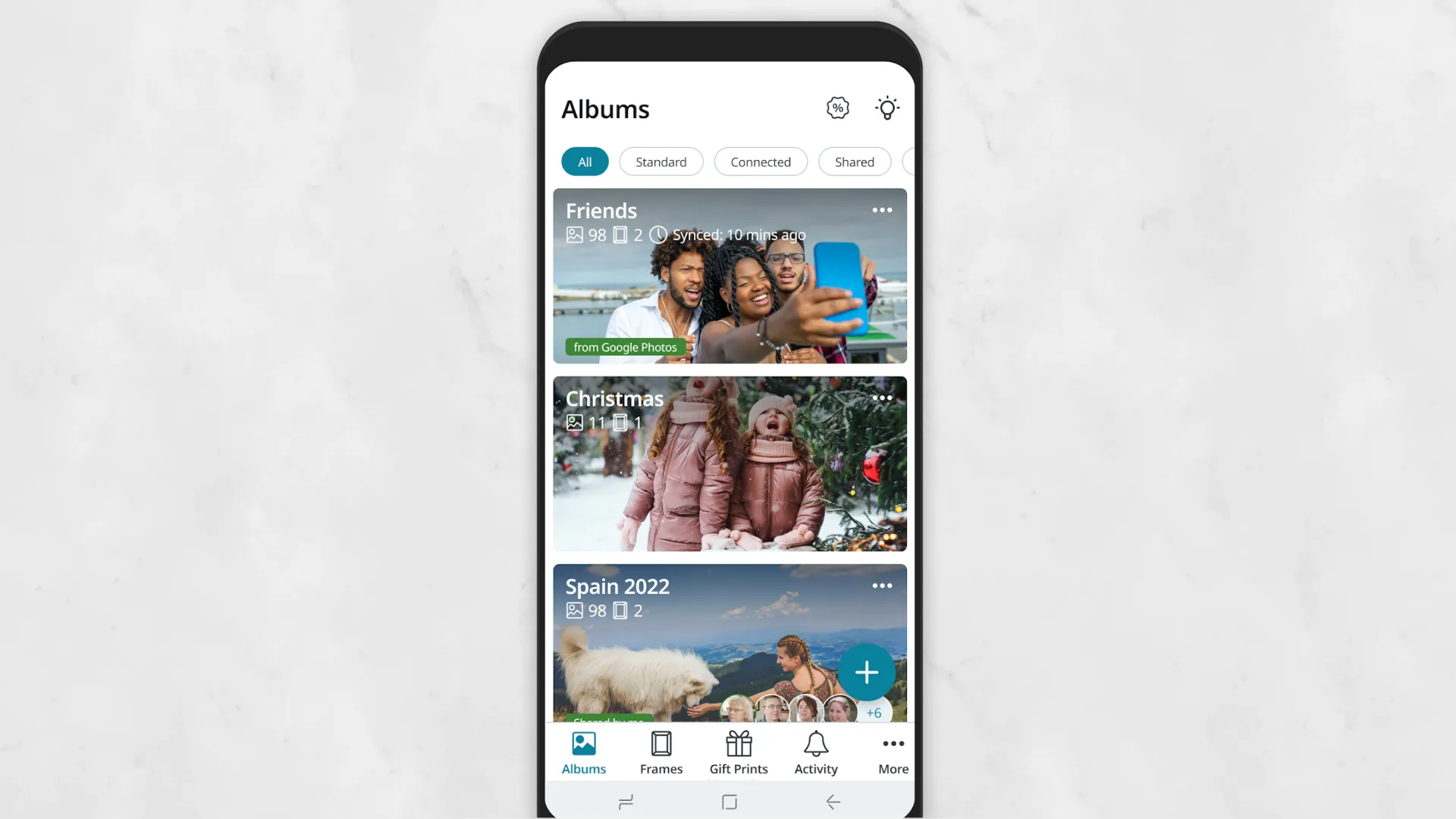
Unlike Aura, Nixplay actively promotes a subscription model (Nixplay Plus). The free version is limited to 500 MB of cloud storage, videos up to 15 seconds long, and a limit on the number of connected frames. Only by purchasing a subscription (approximately $30/year) do you get free storage, the ability to upload longer videos (up to 2 minutes), and an extended warranty.
Advantages
- Functionality. Touchscreen and motion sensor.
- Integration. Easily connects to Google Photos, social media, and Dropbox.
- Flexibility. The ability to send photos to the frame via a unique email address.
Flaws
- Paid model. Many important features (long videos, storage space) require a subscription ($30/year).
- Complexity. Due to the abundance of functions, the interface can be overwhelming and difficult for older people to navigate.
Skylight
Unlike Aura and Nixplay, Skylight prioritizes maximum ease of use for its digital photo frames. It's the perfect choice for those who don't want to delve into the intricacies of customizing various settings, but simply want to place them where they want and add their photo collection.
The preferred method for transferring photos to Skylight devices is email. To view a photo, you don't need to open the app; simply send an email with an attachment. And by using hashtags, you can directly send the photo to a specific album.
A unique feature of Skylight digital photo frames is the heart-shaped button. When the recipient presses it, the sender receives a corresponding notification. This creates a sense of real-life communication.
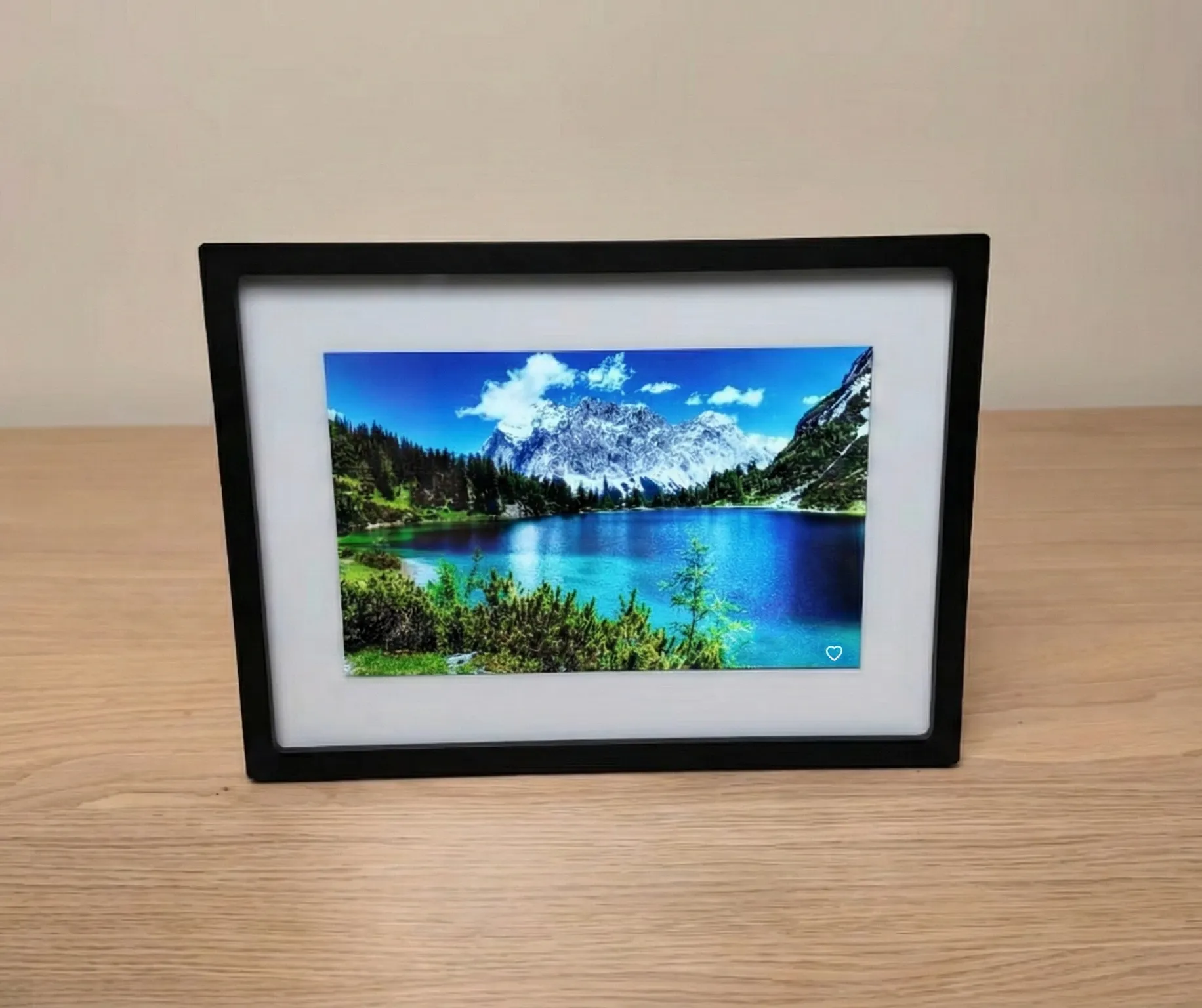
However, the main feature of the Skylight frames is their offline mode, which comes with built-in memory (8 GB in the standard model and more in the newer models). If Wi-Fi is lost, the frame will continue displaying already uploaded photos.
Like Nixplay, Skylight uses a paid Skylight Plus model (~$39 per year). This subscription unlocks the ability to upload videos, add text captions to photos, create in-app albums, and use cloud backup.
Advantages
- Maximum simplicity. Send photos via email.
- Autonomy. Built-in memory (8 GB) allows you to work without Wi-Fi.
- Interactivity. Heart button for instant feedback.
Flaws
- Free version limitations: Album and video creation is only available in Skylight Plus.
- Expensive subscription. Skylight Plus costs about $39 per year.
Professional digital photo albums
For photographers, digital albums are more than just storage; they're a vital link in the creation and delivery of user-generated content. Professional gallery platforms automate the client's photo selection process, protect intellectual property, and increase revenue through integrated sales tools.
Pixieset
While the service was once seen solely as a tool for sharing photos, it has now become a full-fledged business center for professional photographers. Pixieset offers four tools for this purpose: a Client Gallery, a Web Builder, a CRM system and a Store.
A client gallery is a digital album where you, as a photographer, upload photos, and clients receive a link to the online gallery where they can mark their favorites for further retouching or leave comments.
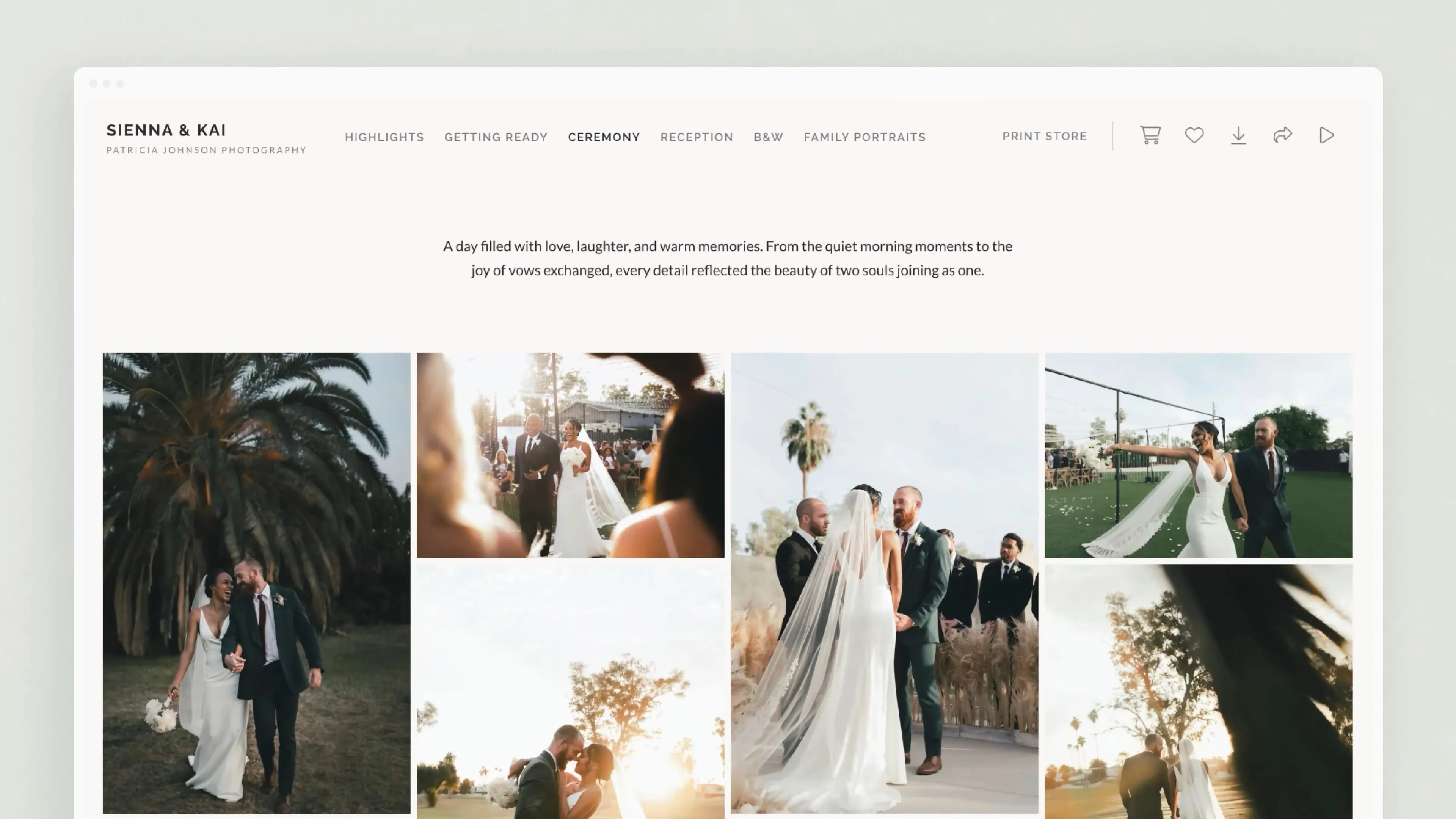
In turn, the photographer receives various access control tools. For example, they can set a password, add a watermark, or restrict download rights (web-size only or only after payment).
Pixieset is the ideal choice for wedding, family, and portrait photographers who value aesthetics and want their brand to look premium. It's a good option for those who don't want to deal with complex settings and are looking for a ready-made solution out of the box.
The service operates on a subscription basis, offering several pricing plans. These vary in the amount of available cloud storage and the range of digital album customization features available.
Advantages
- Comprehensive. Includes CRM, store, and website builder.
- Control. Flexible security settings (passwords, watermarks, download limits).
- Aesthetics. Clean and professional look of galleries "out of the box."
Flaws
- Price. Large storage volumes require an expensive monthly subscription.
- Static. Fewer opportunities for dynamic storytelling than competitors.
Pic-Time
At first glance, Pic-Time might seem to offer the same capabilities as Pixieset. However, its digital albums are full-fledged storytelling experiences, more than just a grid of images.
- Photo and video fusion. You can upload videos (up to 90 minutes in 4K) directly to the shared feed. These can be Reels-like videos or wedding clips, interspersed with photos, creating a living album.
- Slideshow. The slideshow maker has a built-in tool for automatically synchronizing transitions with audio. Choose music from the library (10,000+ licensed tracks), and the service automatically adjusts the frame transitions to the rhythm and mood of the melody.
- AI features. The platform features built-in AI search that identifies and recognizes faces and allows you to find photos based on their context. As a result, digital album visitors can easily find images of themselves, loved ones, or cherished moments.

The service is free to use, but access to all features requires a subscription. Smart Search is only available to customers with the maximum plan of $42/month.
Pic-Time should be viewed not simply as a gallery for delivering finished photos to a client, but as a tool for capturing the emotional impact of a shoot. It's well-suited for weddings, family, and commercial projects, where the overall impression of the story is more important than the number of shots.
Advantages
- Multimedia. Combines photos and 4K videos in a single feed.
- Atmospheric. Built-in slideshow builder with licensed music.
- Smart search. AI facial recognition helps guests quickly find themselves in the vast album.
Flaws
- High cost. Advanced AI features are only available on the highest plans ($42/month).
- Complexity. The abundance of tools may take time to master.
CloudSpot
CloudSpot's hallmark is its speed and simplicity. A client-side gallery is designed for quickly uploading, selecting, and downloading photos.
The photographer uploads the photo shoot, and the client receives a link to an online album with a responsive interface for computers and mobile devices. They can view the photos without registration, download files, and make secure payments.
The service is optimized for instant sharing. With one click, clients can send a photo to Instagram or a link to family members, while maintaining the photographer's signature style.
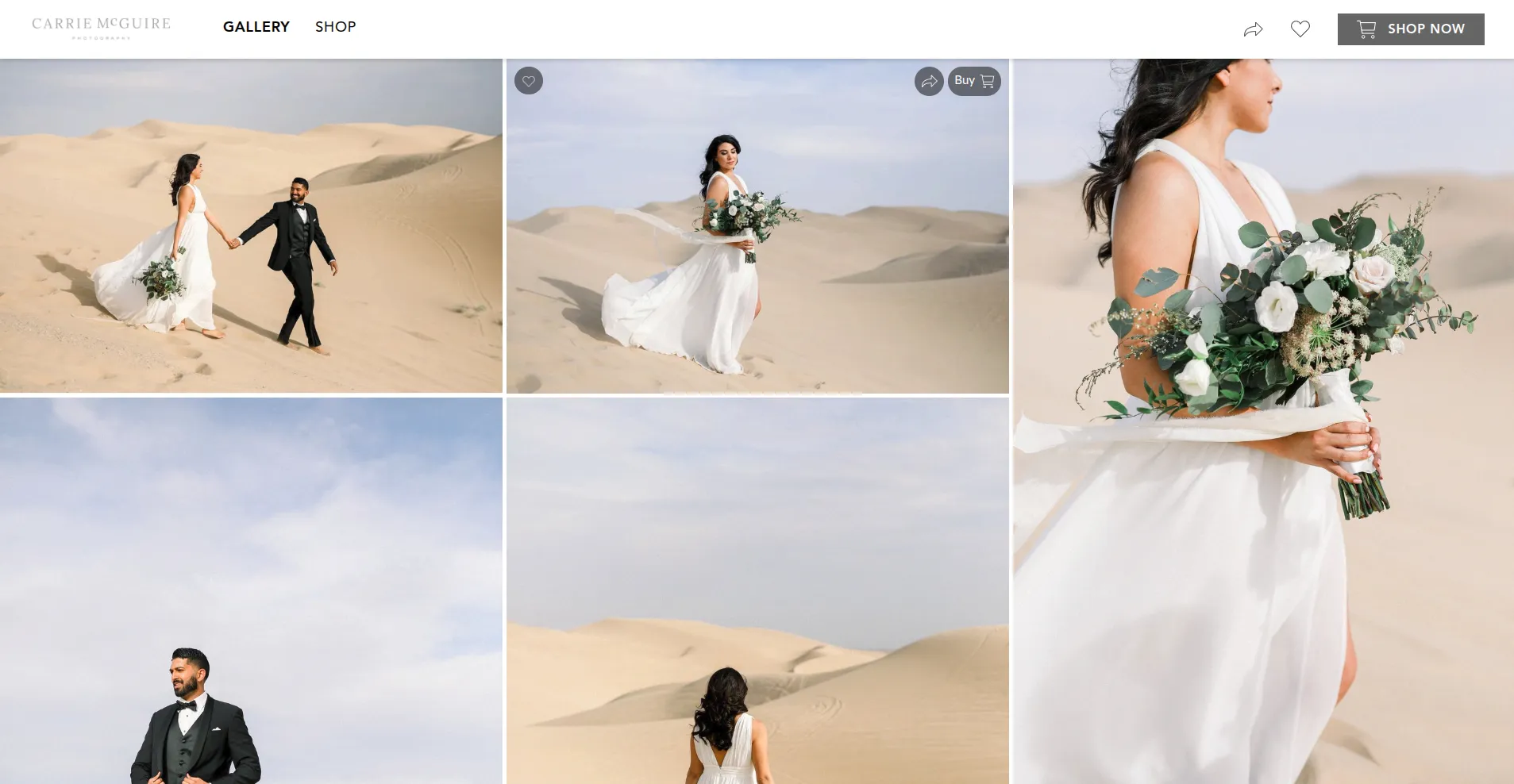
Like Pixieset, it features a "Favorites" system, but it's faster and more intuitive on mobile devices. The photographer sees the client's selection in real time, shortening the retouching approval cycle.
CloudSpot is a golden mean, you could say. It takes the elegance of Pixieset and adds modern mobile ergonomics without overwhelming the user with complex AI functionality like Pic-Time.
Advantages
- Speed. Optimized for instant viewing and downloading on mobile devices.
- Simplicity. Customers don't need to register to view or purchase.
- Ergonomics. Convenient "Favorites" system that works in real time.
Flaws
- Functionality. Fewer AI-powered features than Pic-Time.
- Narrow specialization. The emphasis is on content delivery rather than long-term storage.
Local digital album managers
Cloud services (Google Photos, iCloud) offer maximum convenience and accessibility, but carry risks related to privacy and subscription dependency. Local photo managers offer an alternative. They offer the same digital album creation features, facial recognition, and timelines, but all calculations are performed locally on the user's device. The data never leaves the home network, eliminating the possibility of third-party analysis for advertising purposes.
ImageRanger
ImageRanger is a powerful tool that can create themed digital albums and organize your local photo archive while maintaining complete control over your privacy.
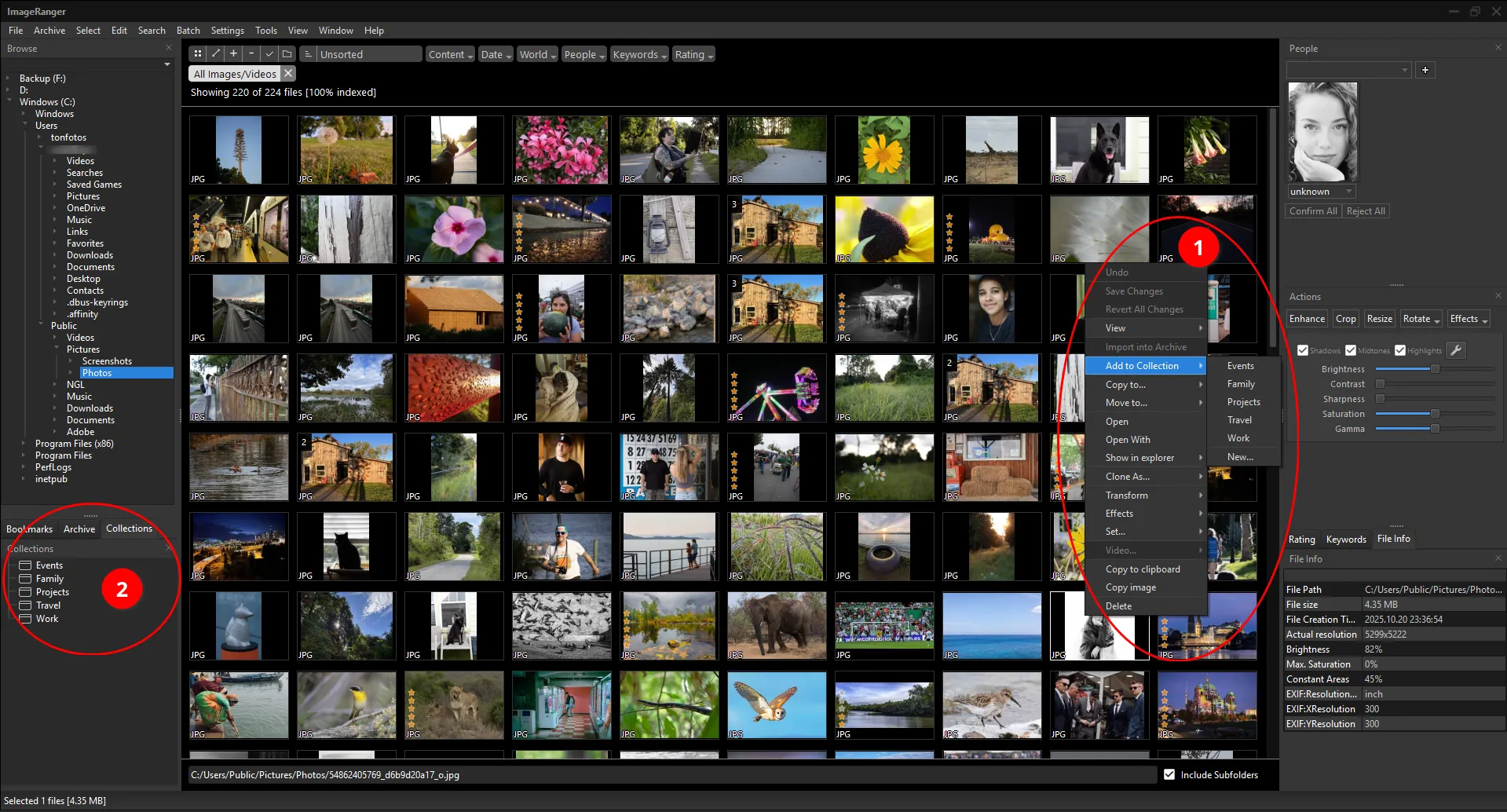
The program allows you to create an unlimited number of photo albums, both by events and dates. And you don't have to do it manually. ImageRanger includes automatic cataloging tools, such as by date and location tag.
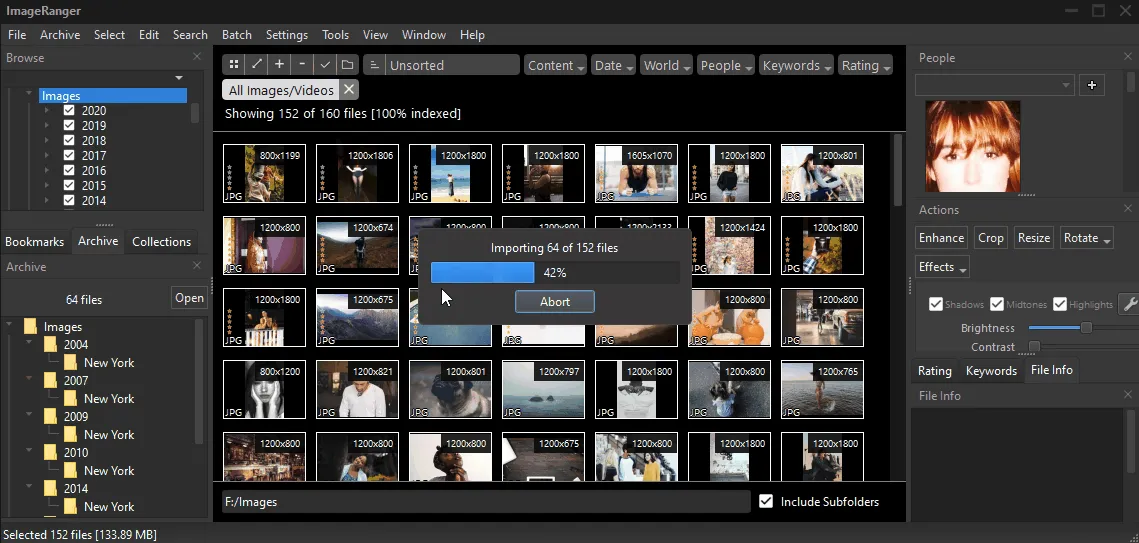
The program has a built-in AI algorithm for identifying people's faces in photographs. You can assign names, organize people into groups, and instantly find all photos of a specific person in your archive dating back ten years.
The filtering system allows you to instantly sort photos by camera specifications, geolocation, or pre-added keywords. This makes ImageRanger an effective tool for creating family digital photo albums and finding the right photo in seconds.
However, mastering the entire software suite can take time. Despite the well-thought-out layout of all controls, the interface feels cluttered.
ImageRanger is distributed under a lifetime license. The Home version costs $45, while the Pro version costs $89. The key difference between the two is their support for RAW photo formats.
Advantages
- Powerful search. Filter by any technical parameters (ISO, aperture, geolocation).
- Automation. Automatically sorts thousands of photos by date and location.
- Lifetime license. Pay once and use forever.
Flaws
- The interface looks cluttered and difficult for a beginner.
- The Pro version is priced at a significantly higher price ($89). RAW format support is significantly more expensive.
Tonfotos
Unlike general-purpose catalogers, Tonfotos is designed from the ground up around the idea of a clear visual archive, where people, events, and the connections between them play a key role, rather than the file structure of a disk.
The program operates entirely locally: photos are indexed on the user's computer, and facial recognition and image analysis are performed without sending data to the cloud. This makes Tonfotos especially attractive for those who consciously avoid Google Photos and iCloud for privacy reasons.
Tonfotos's interface is noticeably simpler than ImageRanger's. It's not overloaded with technical filters and camera parameters, but rather emphasizes visual viewing and logic, "like a normal person, not a photographer." This makes the program well-suited for shared use within families, including with elderly relatives.
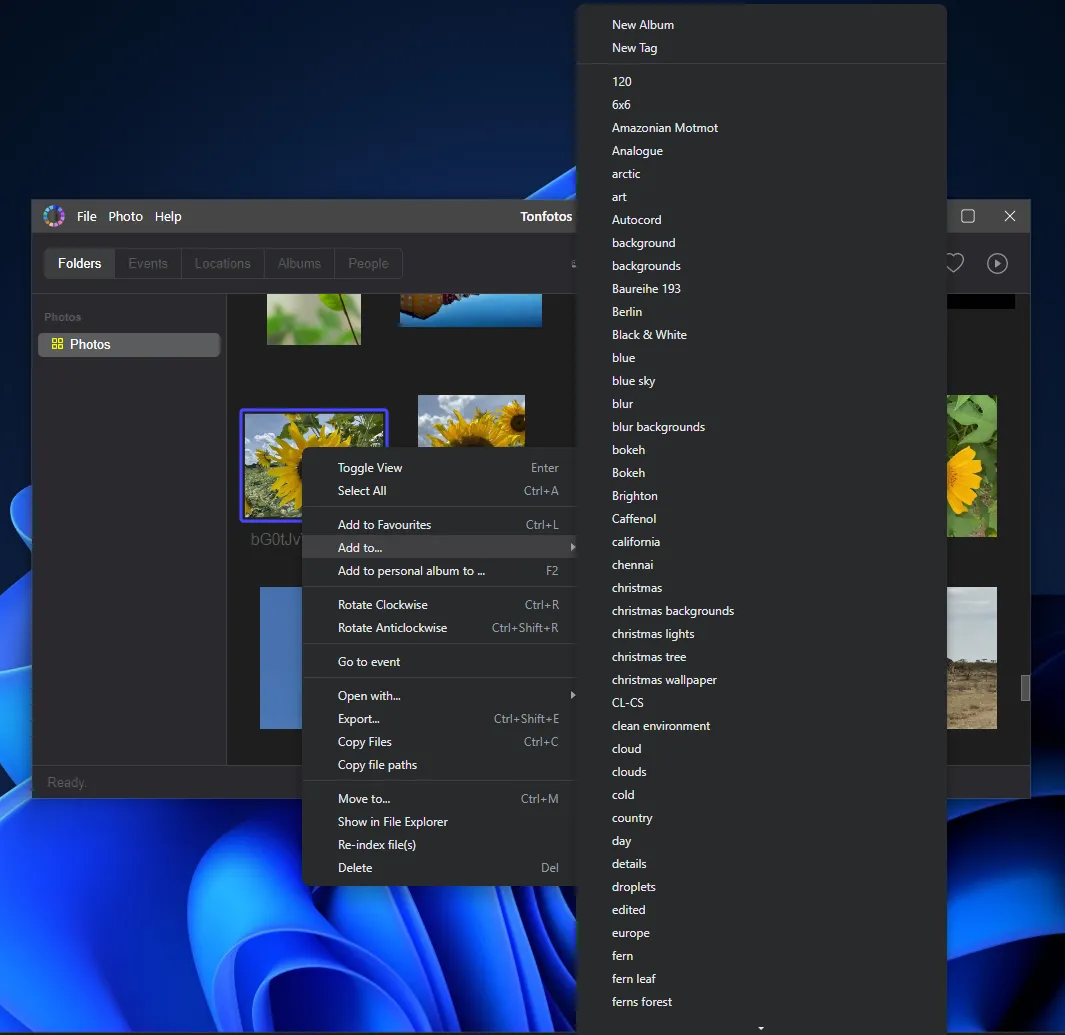
For example, to add a photo to an album, simply open the context menu and select the appropriate option (or create a new one) from the drop-down list.
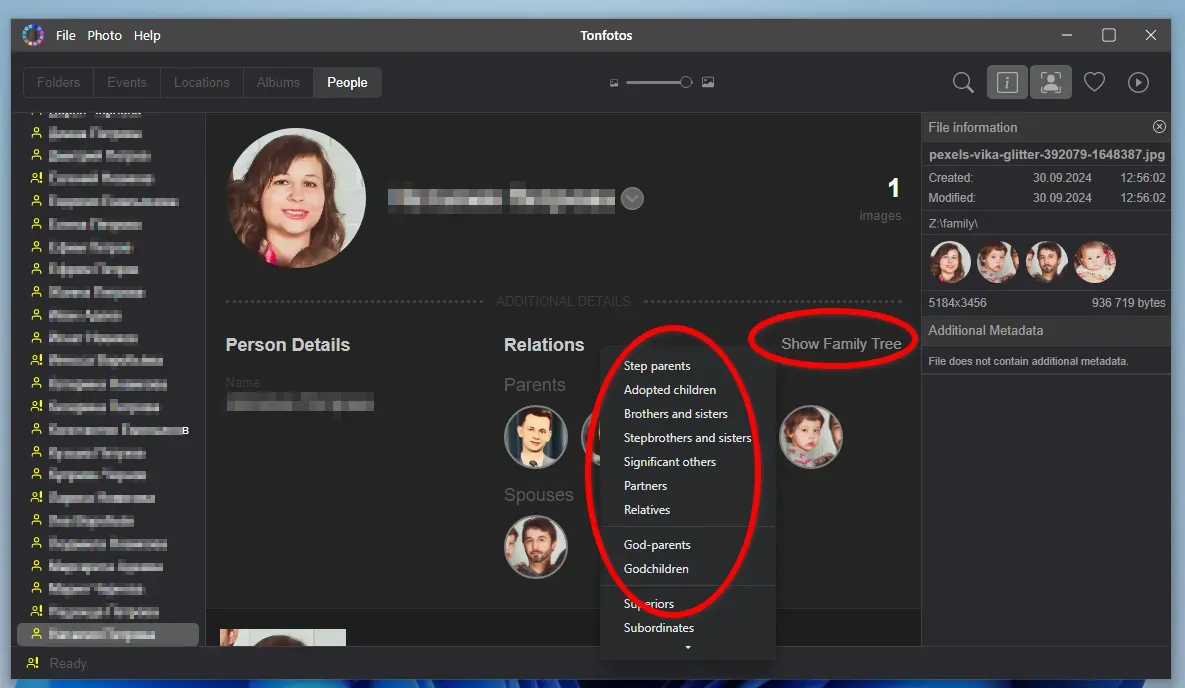
The app automatically detects faces in photos. You can create family relationships or connections between individuals. As a result, your photo archive gradually transforms into a visual family chronicle, where you can view, for example, all the photos of your grandmother, grandchildren, or an entire family branch.
The program is distributed under a one-time license with no subscription. There's a free version with limitations and a paid version for full use of large archives. Tonfotos is available for Windows, macOS, and Linux, which is rare for software of this class.
Advantages
- Genealogical focus. Allows you to build connections between people and keep a family history.
- Simplicity. The interface is intuitive, even for the untrained user.
- Cross-platform. Works on Windows, macOS, and Linux.
Flaws
- Features for professionals. Fewer tools for technical image analysis than ImageRanger.
- Limited free version. Requires a license to work with truly large archives.
Conclusion
A modern digital album is more than just a folder on a disk. It's a way to meaningfully organize your personal history. The choice of a specific tool today is determined not only by storage capacity but also by your attitude toward the balance between access speed and privacy. While some solutions rely on the "magic" of AI and instantaneous sharing of emotions via the cloud, others return full control of their digital sovereignty to the user.
Ultimately, the value of a program or device is measured by how easily it allows you to transform the chaos of thousands of photos into a living narrative. Technology merely provides the canvas, but it's the conscious choice of tool that ensures your memories aren't lost in the digital noise, but become an accessible and protected legacy for future generations.