Top Adobe Alternatives for Photo Editing and Organizing
Updated: January 12, 2026 Author: Vitaly
This article presents an analysis of software that could serve as alternatives to Adobe Creative Cloud products. Only solutions with functionality comparable to generally accepted industry standards in cataloging, photo processing, graphics creation, and editing are presented.
The applications included in Adobe Creative Cloud are truly powerful tools for professional photo editing and organization, as well as for creating graphic and motion design elements. These solutions were a true revolution in their time, laying the foundation for Adobe Systems' subsequent expansion and market domination.
Until recently, there were virtually no alternatives to the company's products that offered similar or even comparable functionality. However, by 2026, the market for professional digital content creation software will reach a tipping point. Adobe Systems' monopoly, established in the early 2010s with the introduction of the Creative Cloud subscription model, is facing unprecedented pressure. This is driven not only by economic factors such as rising operating costs for studios and freelancers, but also by the technological maturation of alternative solutions.
The most significant event of 2024–2025 was the acquisition of Serif (developer of the Affinity suite) by tech giant Canva, which led to a paradigm shift in the distribution of one of Adobe's main competitors. Furthermore, other projects are actively developing, including open source and AI-based solutions. Therefore, while 5–10 years ago it was unimaginable that Photoshop or Illustrator could be replaced, today it is a reality that could dethrone Adobe.
Raster Graphics, Photo Retouching: Alternatives to Adobe Photoshop
For a long time, Photoshop was unrivaled, and its name became synonymous with any photo or raster image processing. The problem is that the program's architecture, developed in the 1990s, complicates the radical implementation of modern GPU-based and completely non-destructive editing methods. Although Adobe is gradually adapting the product to new technologies, competitors, developing their engines from the ground up for the era of multi-core processors and GPU acceleration, offer faster and more flexible solutions in many scenarios.
Affinity Pixel (formerly Photo)
With the inclusion of the Affinity graphics suite in Canva's product offerings, basic functionality has become free for both individual and commercial users. This move significantly lowers the barrier to entry for professional users and strengthens competition with Adobe, whose model remains subscription-based.
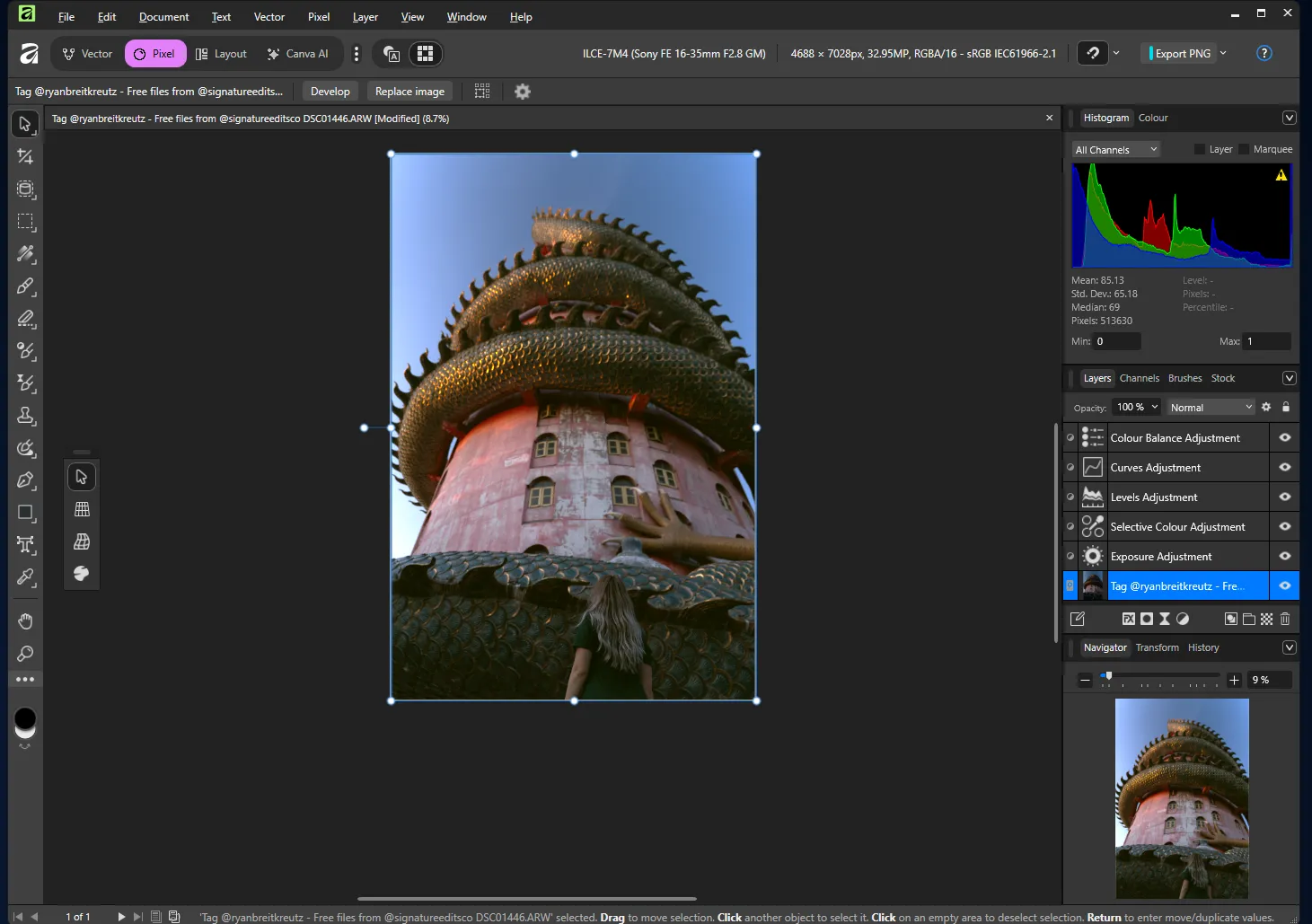
Affinity Pixel users get a full-featured image editor without watermarks or artificial time or feature limitations, but a Canva account is required. Additional monetization is available through a Canva Pro subscription, which unlocks AI tools (image generation and enhancement, intelligent object removal, and other services).
Furthermore, the program is built on modern code and features a highly responsive interface. Affinity Pixel efficiently utilizes multi-core processors and GPU hardware acceleration (Metal on macOS and Direct3D on Windows), ensuring smooth operation when zooming, panning, and painting with brushes, even on complex projects.
This editor is particularly notable for its support for a non-destructive workflow. Many filters and effects can be applied as "live" layers, whose parameters can be adjusted at any stage without damaging the original image. This reduces the need for layer rasterization and makes the editing process more flexible than the classic Photoshop approach.
The only issue hindering widespread adoption of Affinity Pixel is compatibility with PSD files. Complex smart objects and some specific effects can be imported as non-editable rasterized layers, breaking the connection with the original content.
PhotoLine
PhotoLine is a little-known German product developed by two brothers since 1996. It's not aimed at the mass market and doesn't attempt to compete with Photoshop in terms of ecosystem or popularity. Instead, PhotoLine emphasizes technical flexibility, deep color management, and the combination of raster, vector, and publishing features in a single application.
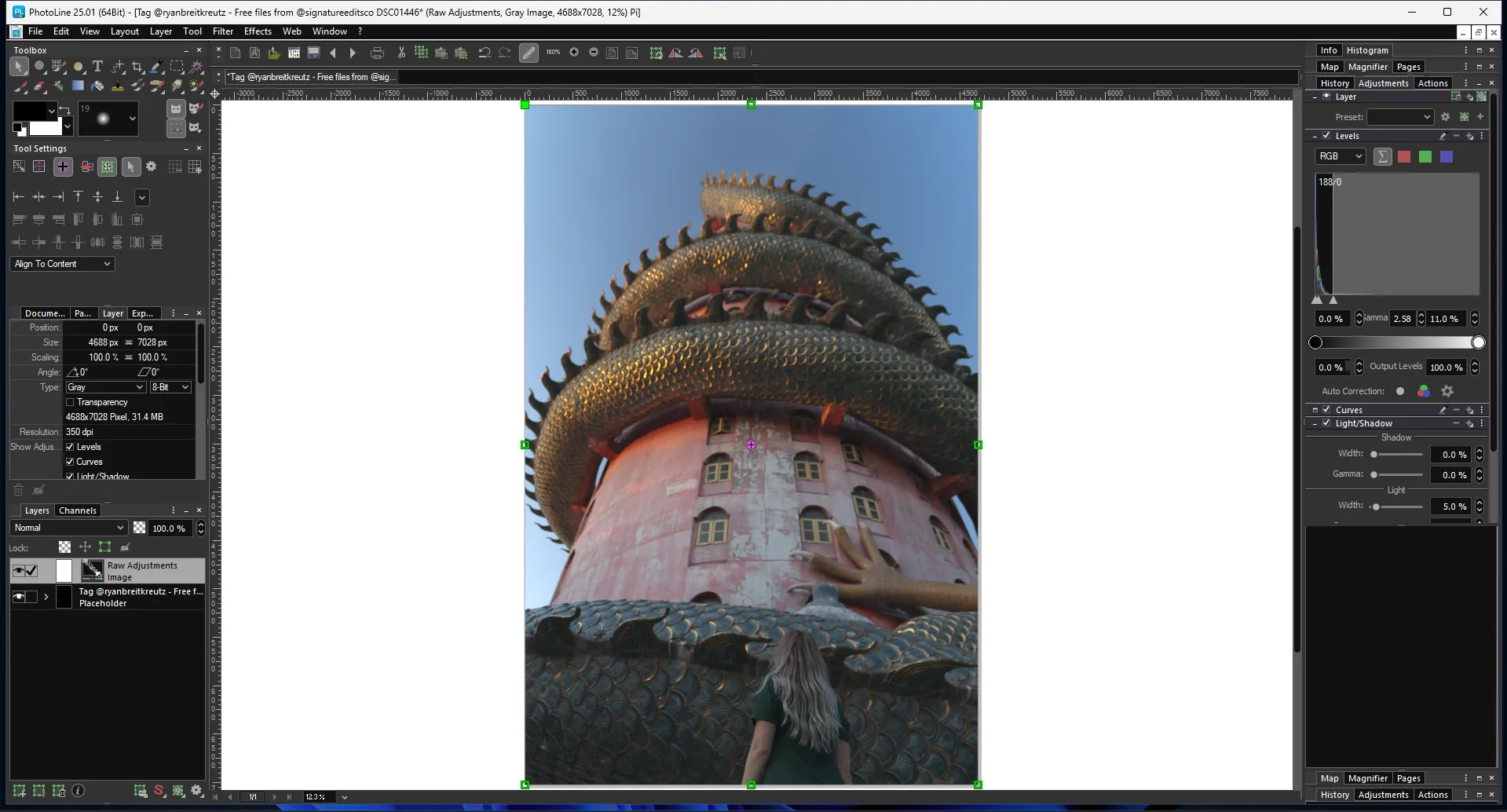
The graphics editor was originally designed for working with high color depth. Therefore, 16/32-bit images are supported by default, regardless of mode, filter, or layer. PhotoLine also supports the Lab color space and offers advanced color correction tools.
Of particular note is the integration of raster editing, full-fledged vector graphics, text editing, and multi-page document work in a single window. This makes the program ideal for layout of brochures, technical documentation, and other printed materials.
Due to its broad functionality and the ability to work with different types of images simultaneously, PhotoLine's interface is overloaded with tools. The unusual layout of the main panels can be confusing even for experienced Photoshop users.
The program is paid and is distributed under the terms of purchasing a perpetual license for a specific version (~€79). Upgrading requires an additional fee (~€39).
Corel PaintShop Pro
Corel PaintShop Pro is a graphics editor from Alludo (formerly Corel Corporation), which, despite slower development compared to the flagship product CorelDRAW, has all the necessary basic functions for editing photos and other raster images.
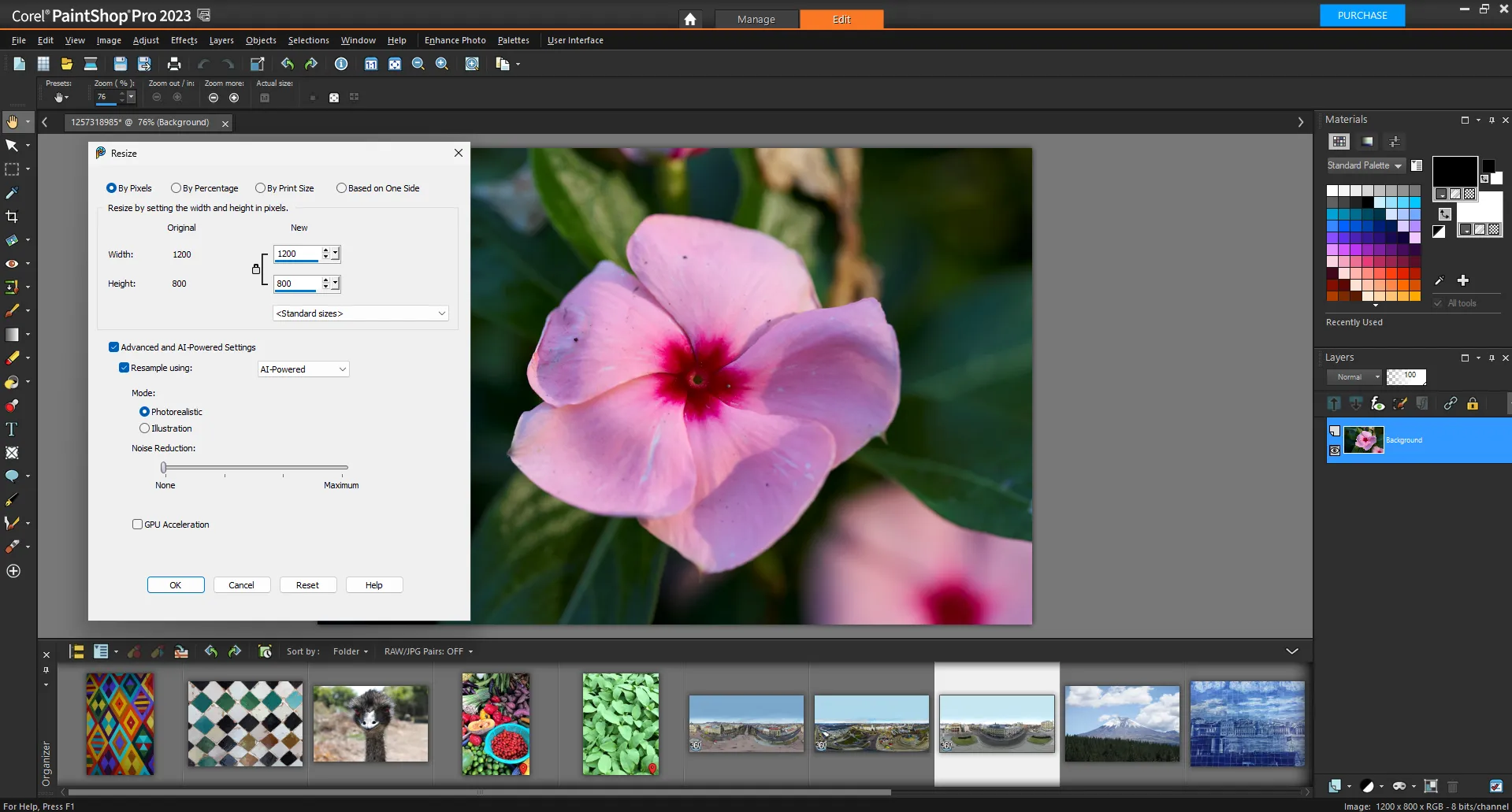
At the time of writing, the current version of the program was released in 2023. It already includes built-in AI Upsampling (resolution increase), AI Denoise (noise removal), and AI Artifact Removal tools, which operate on the local GPU without sending images to the cloud. This cannot be said about Photoshop, where even such image changes are performed remotely on Adobe's server.
A distinctive feature of Corel PaintShop Pro is its adaptive workspace system, which allows you to customize the interface to suit your level and specific tasks.
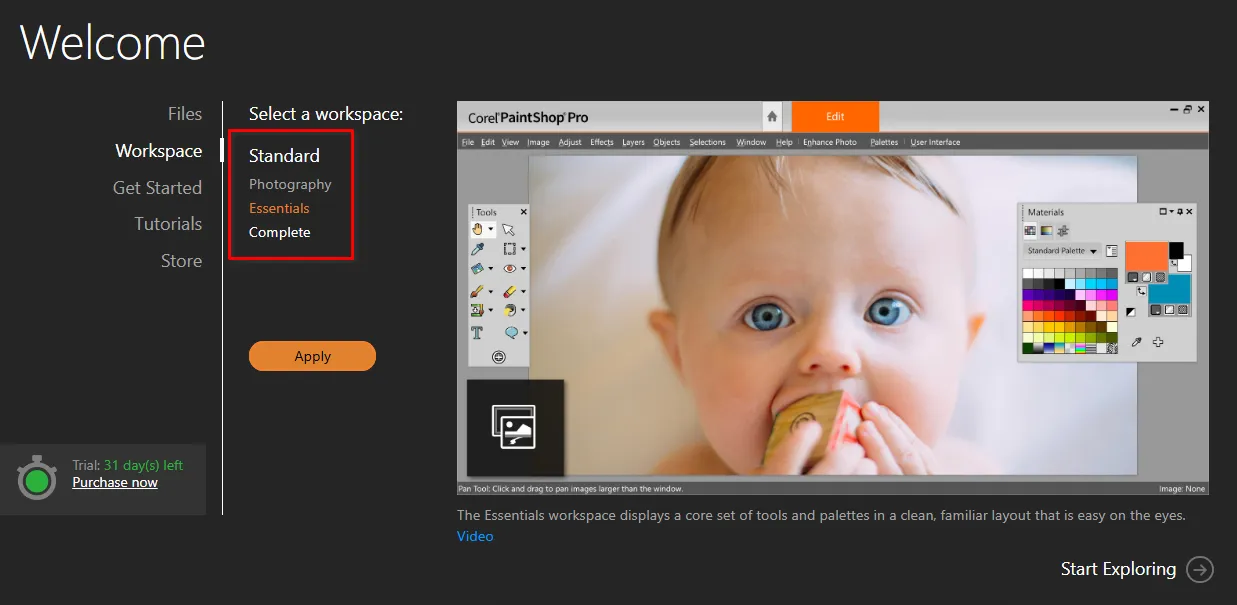
Corel PaintShop Pro is a viable, albeit niche, alternative to Adobe Photoshop. The program covers most photo editing, retouching, and web graphics preparation tasks. It offers automation tools, native AI tools, and a flexible interface, but lacks Adobe's depth of non-destructive editing.
The cost of a lifetime license is $79.99.
Pixelmator Pro
Pixelmator Pro is a multi-functional graphics editor developed by a team of independent developers in 2017 and considered the benchmark for optimization for Apple Silicon architecture (M1/M2/M3/M4 chips). It is rightfully considered one of the best solutions for photo editing and graphic design in the Apple ecosystem. Perhaps this is why the Pixelmator team became part of the global vendor in February 2025.
The app is written in Swift using Metal, Core ML, and Grand Central Dispatch technologies, ensuring excellent performance even on basic MacBook Airs.
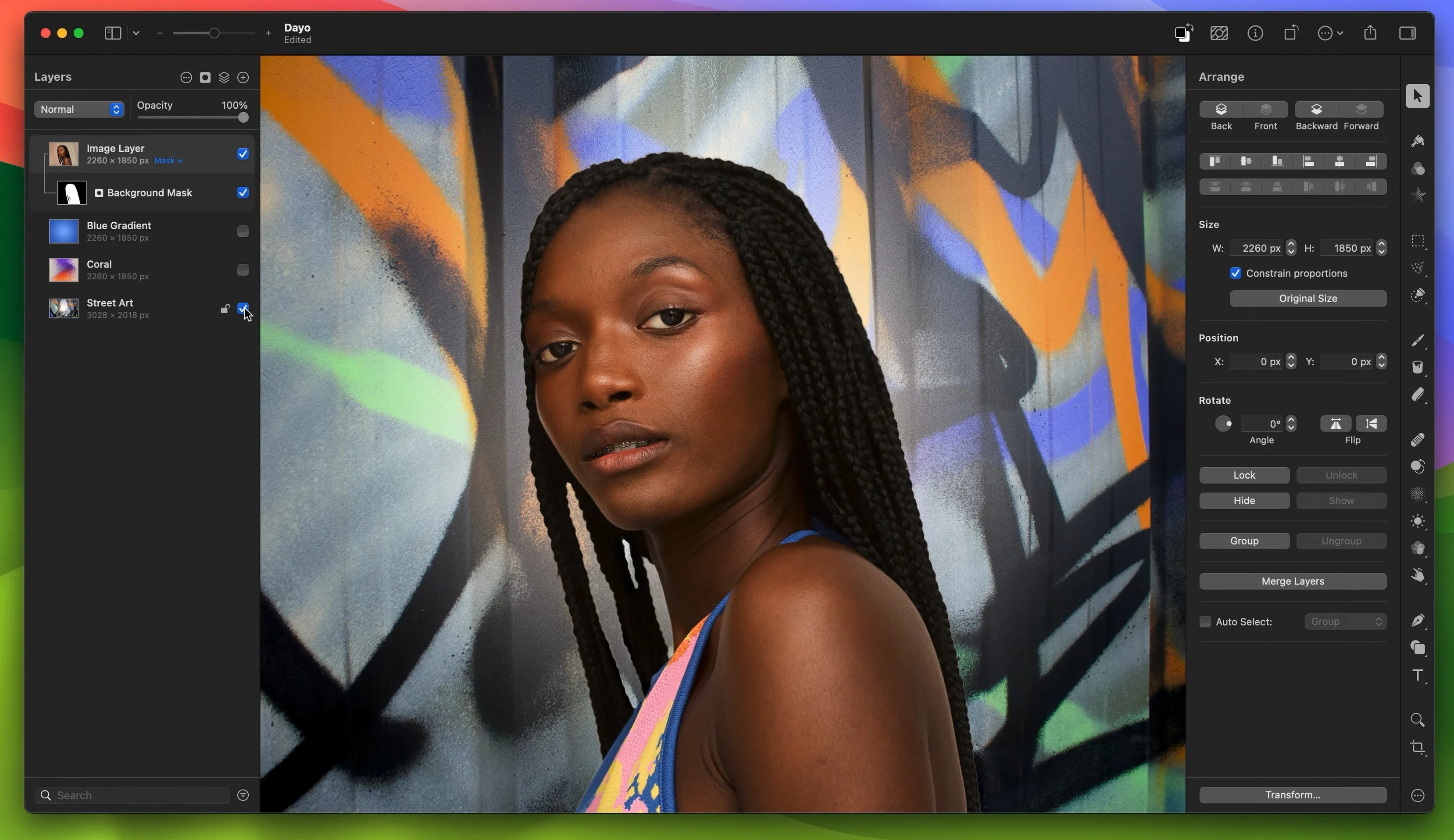
Unlike classic apps that are often cluttered with '90s interface elements, Pixelmator Pro looks like a modern Apple app (like Photos), while hiding powerful tools under the hood for:
- photo retouching and color correction;
- creation of digital paintings and illustrations;
- vector design;
- basic video editing;
- layouts for social networks and the web.
All changes (filters, color correction, effects) are applied in layers, which can be turned off or adjusted at any time.
It's worth noting the built-in machine learning algorithms that can increase photo resolution without losing clarity, remove backgrounds, and automatically correct color. Remarkably, all AI processing is performed locally, meaning user data is not sent anywhere.
If you work on a Mac and don't need Photoshop's advanced compositing tools, Pixelmator Pro is the best value for money.
To start working with the program, you need to purchase a perpetual license for $50.
GIMP (GNU Image Manipulation Program)
GIMP (GNU Image Manipulation Program is arguably the world's most powerful open-source graphics editor. It's the best Photoshop replacement for those who don't want to pay a subscription or who are committed to free software. This is no exaggeration, as GIMP implements all the basic functionality of its Adobe counterpart, lacking only built-in AI tools.
The gap with Photoshop was particularly narrowed with the release of version 3.0, which became a historic event for the project. Prior to this release, the graphics editor suffered from a near-total lack of non-destructive editing (only masks were available). Now, filters and effects applied to a layer can be edited or disabled at any time without undoing all subsequent actions.
However, functions that are similar in principle to Adjustment Layers and Smart Objects are promised to be added only in version 3.2.
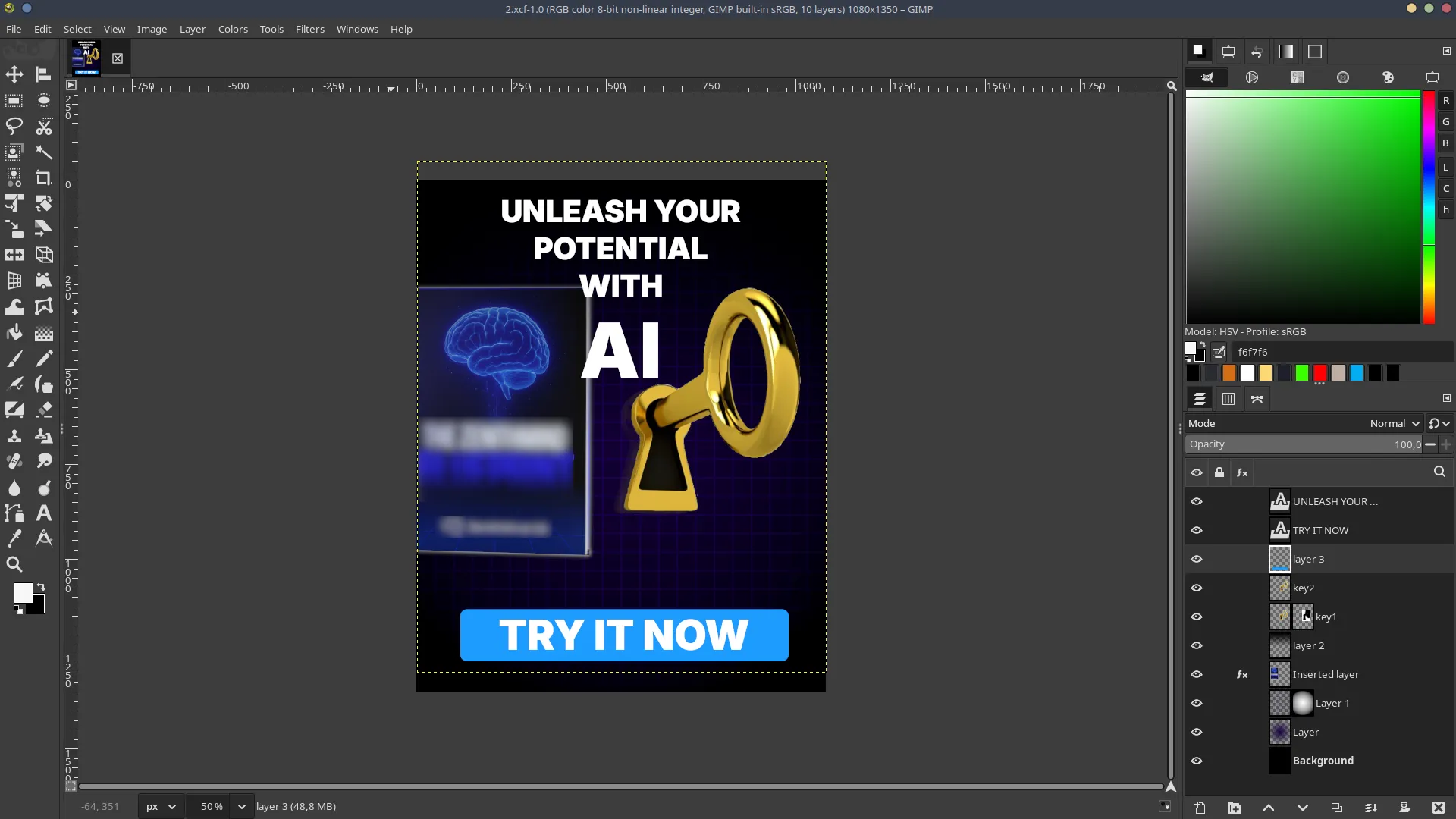
When considering switching from Photoshop to GIMP, be prepared for the fact that most effects are implemented differently. This can be a significant hurdle, as it essentially requires retraining even for basic tasks.
Unlike Photoshop or Affinity Photo, GIMP is RGB-oriented in its architecture. While version 3.0 improved its handling of color profiles, it still lacks full native CMYK support (so you can see and work with the Cyan, Magenta, Yellow, and Black channels).
Compatibility is a separate issue. GIMP opens .psd files, but often breaks layer styles, vector masks, and text blocks. Therefore, it's not suitable for working in a team where colleagues use Photoshop. This is only possible if everything works in GIMP.
Of course, many of this free graphics editor's problems can be solved by installing plugins. But if you're a professional graphic designer working with Pantone and CMYK, GIMP will be more trouble than it's worth.
If your tasks are limited to photo processing (not for print), web design, and creating creative content for social media, GIMP is a perfectly suitable tool. In these areas, the lack of deep CMYK support isn't a problem, and the program's capabilities allow you to quickly and freely create high-quality visual content for posts, stories, and advertising banners.
Professional RAW Processing and Color Grading: Alternatives to Adobe Lightroom Classic
Lightroom Classic is a powerful software for developing digital negatives in RAW format. The problem is that it's not just a developer, but also a photo cataloger. Therefore, alternatives in this segment often outperform Adobe's product in terms of file development quality, offering more sophisticated algorithms and advanced color management.
Capture One Pro 2025
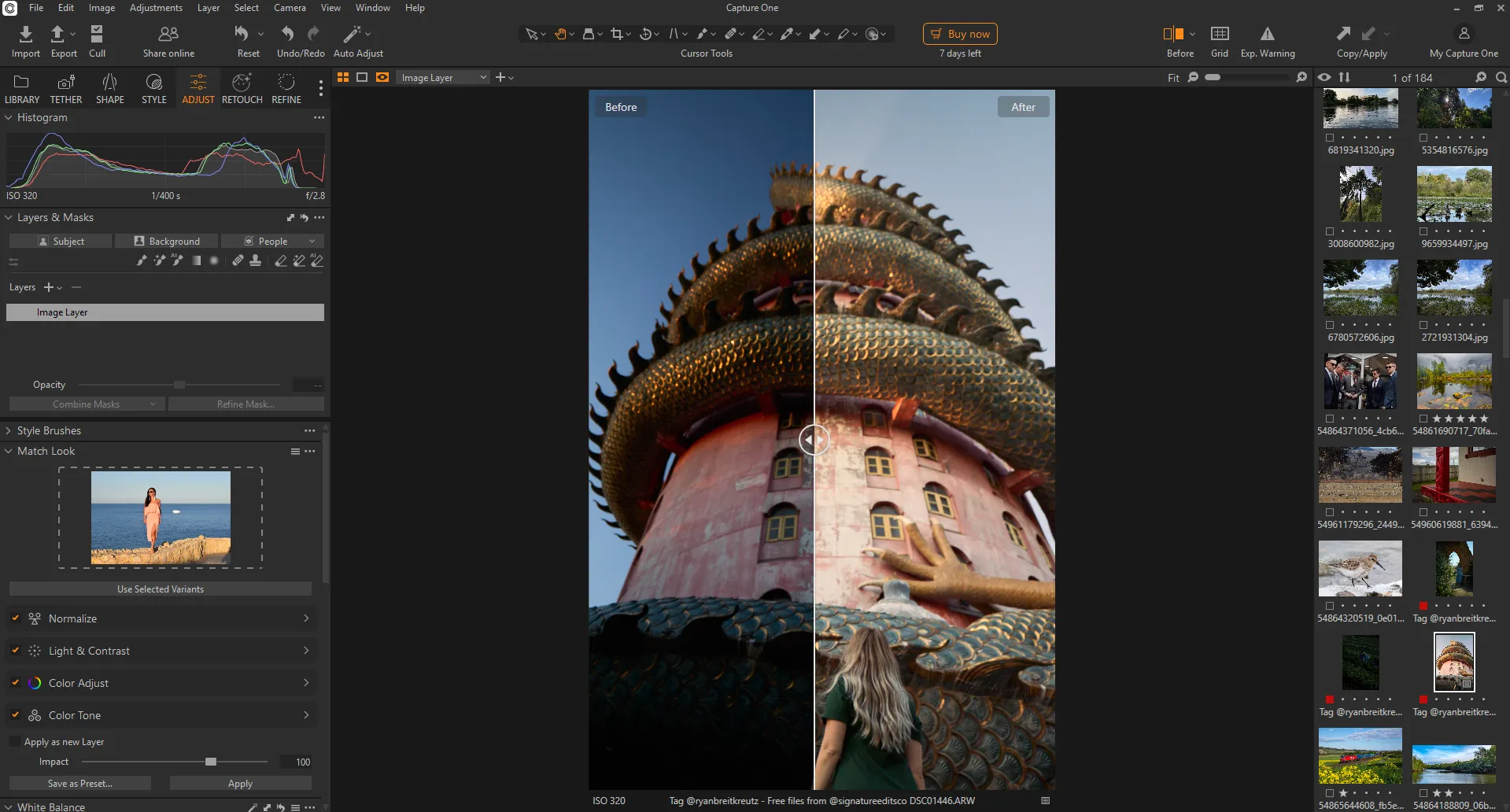
Capture One Pro 2025 is considered the gold standard in the commercial and studio photography industry. It offers truly powerful tools for working with color, exposure, and white balance. Capture One Pro 2025 is capable of extracting maximum detail from shadows and colors with minimal noise.
The program's interface is complex, befitting its status, and even experienced Lightroom users will need time to master it. However, Capture One Pro 2025 placed a strong emphasis on implementing AI tools to reduce the time spent on routine retouching:
- Match Look. Allows you to select a reference photo, and the program will automatically adjust the colors and exposure of your photo to match that style.
- Snap to Eye. When shooting directly into the computer, the program automatically enlarges the model's eyes on the screen for instant focus checking.
- AI Masking. Mask objects, backgrounds, and now individual facial parts (eyes, skin) with a single click.
- Dark Circle Reduction. A new AI tool for quickly lightening under-eye circles without manually applying masks.
- Blemish Removal. Intelligent removal of skin imperfections while preserving texture.
However, for the AI tools to run quickly, a suitable computer is required. The recommended requirements state a discrete graphics card with at least 8 GB of memory, at least 16 GB of RAM, and a processor with 4 or more cores.
In 2024–2025, the company changed the terms of perpetual licenses. Now, buyers receive only the version currently in effect at the time of purchase, excluding free functionality updates (only critical bug and vulnerability fixes). The license itself costs $394.80. However, the option to purchase a boxed version and use it for 3–4 years without additional charges remains a significant economic advantage, as Adobe's prices may increase more rapidly during this time.
DxO PhotoLab 9
Unlike Lightroom Classic, DxO PhotoLab 9 completely lacks photo organization tools. Its functionality is focused on processing RAW negatives. It's suitable for those who prioritize high optical accuracy and effective noise reduction.
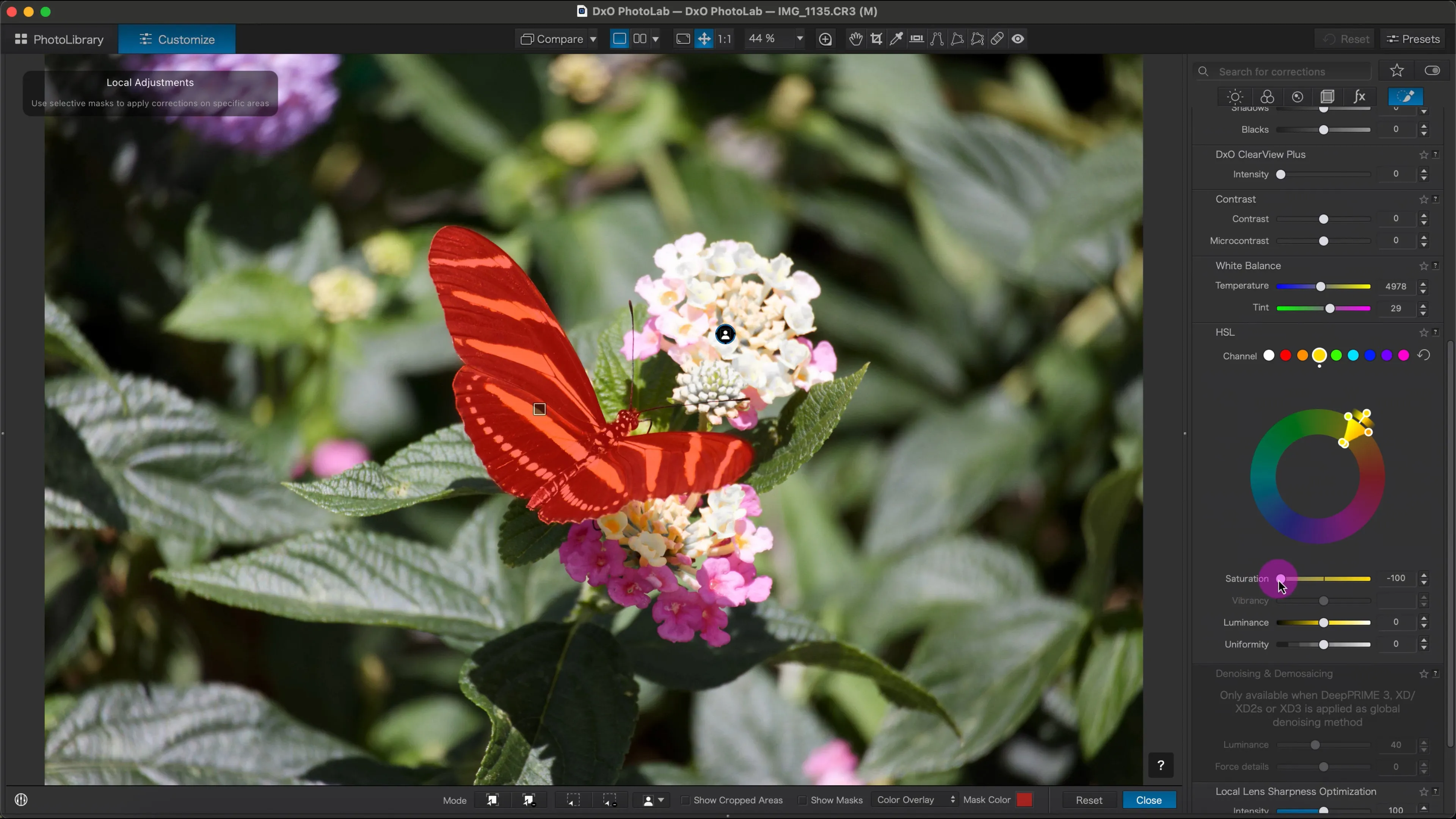
A particularly notable feature in DxO PhotoLab 9 is its automatic correction of image defects specific to specific camera models and lenses. It draws on a vast database of lab tests to eliminate distortion, vignetting, and chromatic aberrations with surgical precision.
As of this writing, this is the latest version of DxO PhotoLab 9, which was released in September 2025. It has many new features, including those using AI models.
- DeepPRIME XD2s and XD3. Enhanced noise reduction algorithms based on deep learning. The XD3 version is specifically optimized for Fujifilm X-Trans sensors.
- AI Masks. AI tools for instantly selecting the sky, people, background, or individual objects. Masks can be combined and inverted.
- Localized noise reduction. In v9, you can now apply DeepPRIME and sharpening correction to specific areas of a photo (using masks).
- U Point. Control point technology for localized color and brightness adjustments without complex selections.
- Smart Lighting. Intelligent exposure compensation that brings out details in shadows without sacrificing naturalness.
- Support for Apple ProRAW and HEIF. Full compatibility with modern iPhone formats.
It is important to note that the performance of AI functions is highly dependent on computer power, as they operate locally.
DxO PhotoLab 9 is a good RAW alternative to Lightroom when it comes to final adjustments and image quality enhancements. However, if you need a tool not only for editing but also for cataloging, cloud syncing, and integration with other Adobe applications, Lightroom remains the superior choice.
A lifetime license costs $239.99 (before discount), but it doesn't include automatic software updates to the latest version. This requires an additional $95.99 upgrade, but it's not necessary unless you plan to upgrade your camera equipment annually or don't have a pressing need for the latest features.
ON1 Photo RAW 2026
In terms of editing capabilities and photo organization features, ON1 Photo RAW 2026 is a cross between Lightroom and Photoshop. The program not only handles the usual color correction, exposure correction, and horizon alignment features of all developers, but also creates complex compositions from multiple images or individual elements. An advanced masking system lets you select objects (people, animals, the sky, architecture) with a single click. The tool is so powerful that it effortlessly handles details like hair and fur.
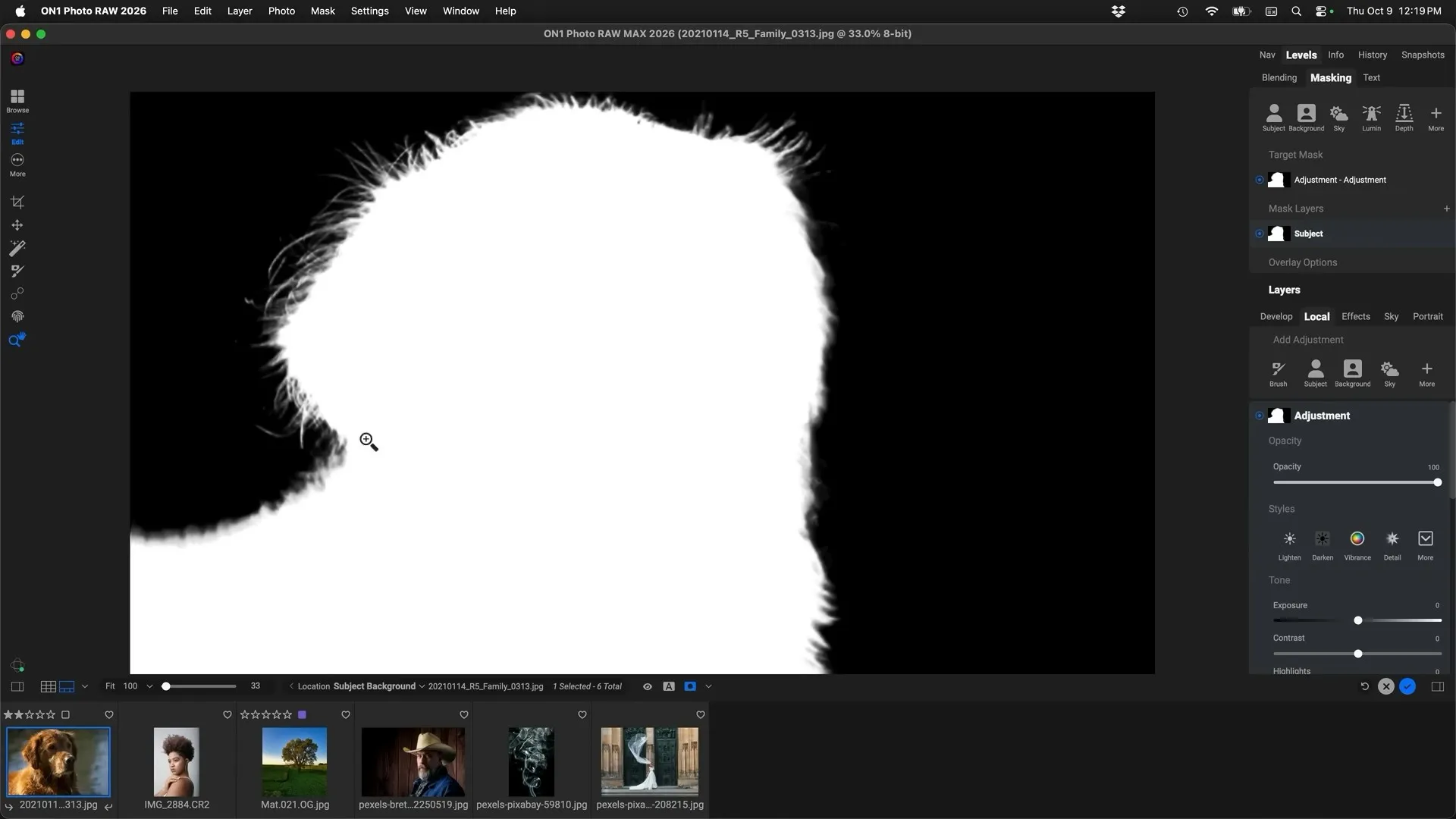
Many of the program's functions are powered by machine learning technologies, which ensure accuracy and speed up the entire photo editing process.
- Resize AI 2026. A powerful photo upscaling tool built directly into the engine. It uses generative models to restore detail even in very small or noisy images.
- Generative removal and cropping. Similar to Adobe Generative Fill. Allows you to seamlessly remove unwanted objects while filling the background or "paint" the edges of a photo when recomposing.
- Depth effects. The program creates an AI-powered depth map of the photo, allowing you to change the lighting separately for the foreground and background or add realistic fog.
- Brilliance AI. Intelligent automatic correction that analyzes every section of a photo and applies localized tone and color adjustments.
These are truly impressive tools, but they require some computer resources. 32GB or more of RAM and a graphics card no lower than an NVIDIA RTX 3xxx or AMD Radeon RX 6xxx are recommended.
If you're looking for an alternative to an Adobe subscription while maintaining your familiar workflow (RAW development, masking, and retouching), ON1 Photo RAW 2026 is an excellent choice. A perpetual license costs $119.99, significantly lower than Lightroom's monthly fees (~$12/month or ~$144/year), and the program can be used simultaneously on two computers.
Luminar Neo
The Luminar Neo graphics editor differs somewhat from the Adobe Lightroom alternatives discussed in this review. Here, automation and AI are not supplementary, but rather core tools for editing photos and other raster images, simplifying and accelerating the workflow.
With Luminar Neo, you can quickly perform artistic editing. For example, when you need to transform a daytime photo into a sunset in a couple of clicks, automatically remove wires and blemishes, expand the frame boundaries, or replace an object using generative AI.
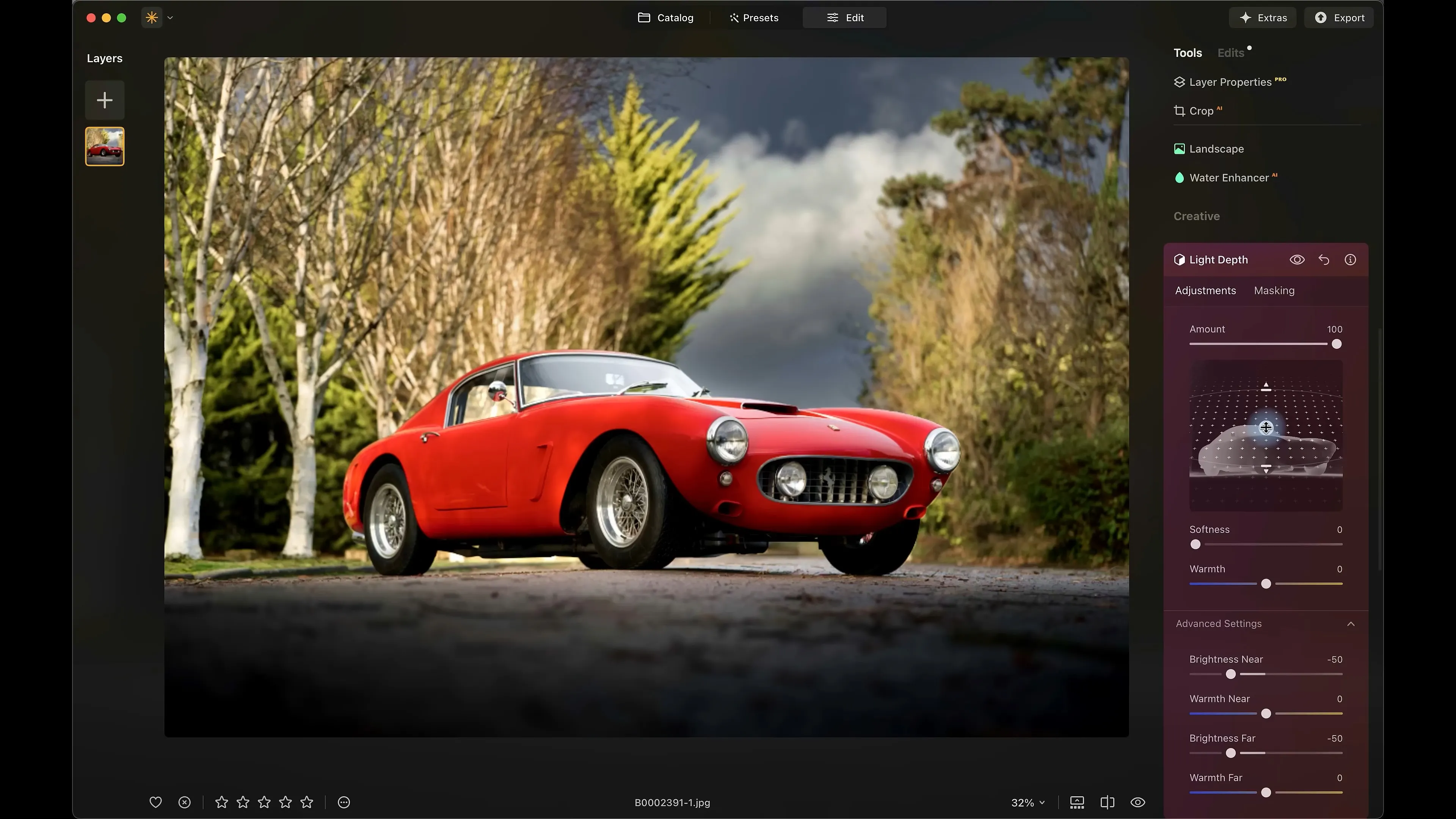
The Light Depth tool deserves special attention. It creates a 3D depth map of the frame, allowing you to virtually move light sources within the photo. Why is this necessary? In a standard photo editor, to brighten a person against a dark forest, you need to manually draw a mask. With Light Depth, you can simply move the "near light" slider, and the AI, understanding the distance to objects, brightens only what's close to the camera (for example, a car), without affecting the trees behind. This creates a professional "volume" effect that was previously only achievable through complex masking.
Luminar Neo is a powerful photo editing tool with extensive integration of modern AI technologies and a simple interface. It's especially suitable for speeding up the creative process and automating routine tasks.
Please note that Luminar Neo's perpetual license, priced at $287.00 (before any discounts), has some caveats. For example, you won't be able to upgrade to future versions without an additional fee, and the AI-powered generation tools will only work for one year from the date of purchase. To renew for another year, you'll need to pay the full license fee again. However, this doesn't apply to AI-powered editing tools.
Darktable
DAM is the closest analogue to Lightroom in terms of interface and functionality. It's a professional open-source RAW converter with a non-destructive editing system. Unlike simple editors, it doesn't alter pixels in the original file, but instead records the sequence of mathematical operations in a separate edit file (.xmp).
Like many open-source projects, the program lacks built-in AI models or other automation tools. The entire editing process is manual. Therefore, it's not well-suited for commercial projects where processing speed is paramount.
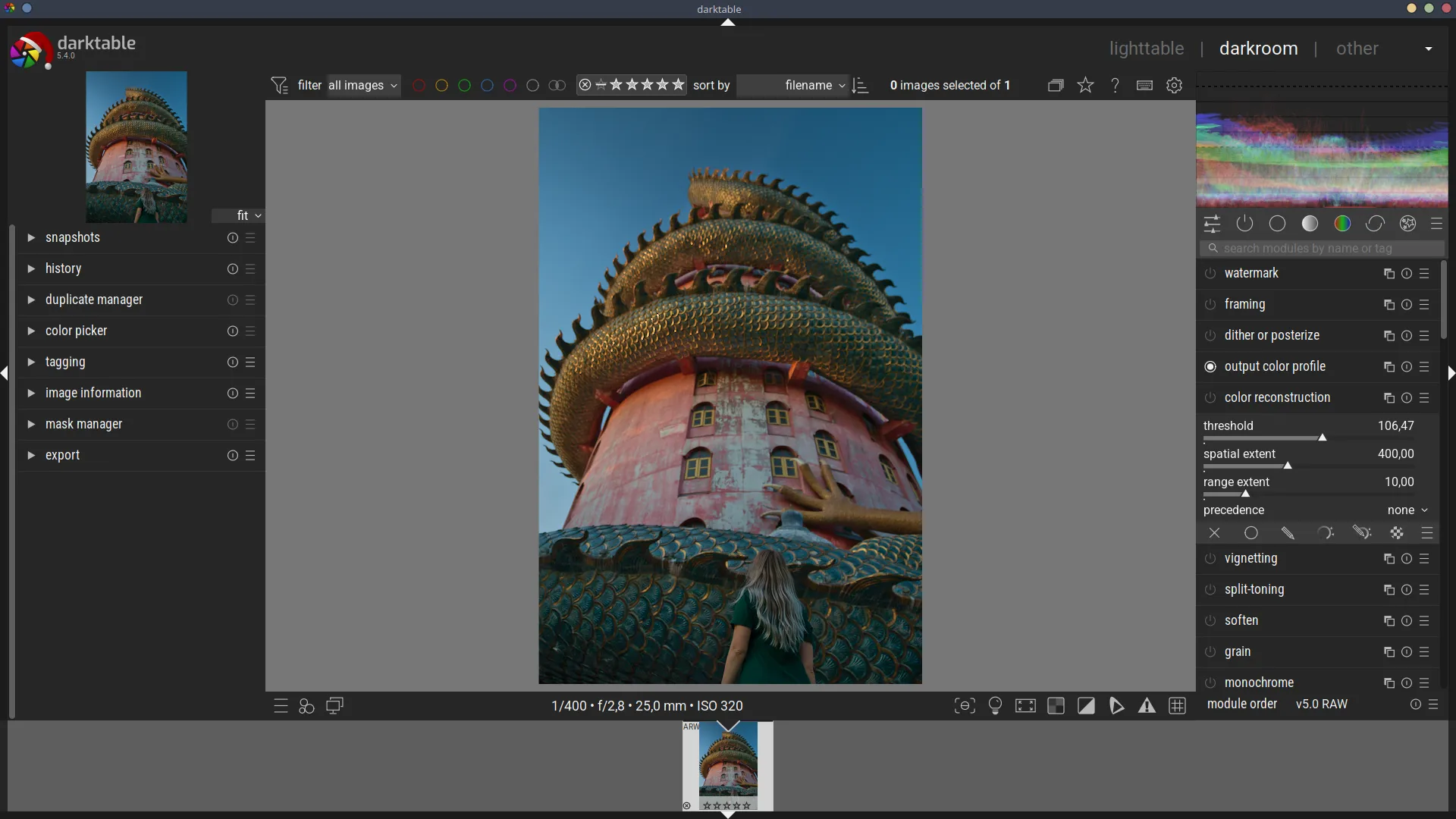
Darktable is the choice of enthusiasts who prefer complete control over the process. The program offers over 60 processing modules, which can be duplicated and rearranged. Darktable lets you combine hand-drawn masks with parametric ones (for example, "apply an effect only to blue pixels in the shadows"). Lightroom lacks this kind of control.
The price of using Darktable for free is the time it takes to learn and quickly apply the editing settings.
Photo Organizing and Archive Cataloging: Alternatives to Adobe Bridge
Adobe Bridge is often perceived by users as a simple add-on to Photoshop, but its role in the Adobe ecosystem is much deeper. It serves as a link between Creative Cloud applications, allowing photographers and graphic designers to easily organize their archives. Adobe Bridge's key competitive advantage, which is virtually impossible for third-party developers to replicate, is its ability to natively work with the company's proprietary formats: .PSD (Photoshop), .AI (Illustrator), .INDD (InDesign), and .AEP (After Effects).
This is one of the few Adobe apps that is free, but it comes with some caveats. Installation is only possible with the Creative Cloud launcher and an Adobe account. If a subscription is missing or has expired, the ACR module enters limited functionality mode. Users can see previews of RAW files, but cannot open them for viewing or editing.
These limitations make it impossible to use Adobe Bridge as a standalone application, which is the main reason for looking for alternatives.
Tonfotos
Unlike Adobe Bridge, which scans directories in real time, Tonfotos uses an indexing engine. When the user adds a folder, the program scans the directory, reads metadata, and builds an internal database.
The advantage of using a database is that the original files remain in their folders on your hard drive, network-attached storage (NAS), or external drive. This approach allows you to consolidate all your photos into a single library without worrying about where they are located.
Tonfotos works largely by reading photo metadata: dates, geolocations, titles, descriptions, tags, and the technical specifications of the camera used to take the photos. However, the program's main feature is its built-in machine learning facial recognition algorithm. Simply enter a person's name once, and the neural network will find them across all photos stored in the library.
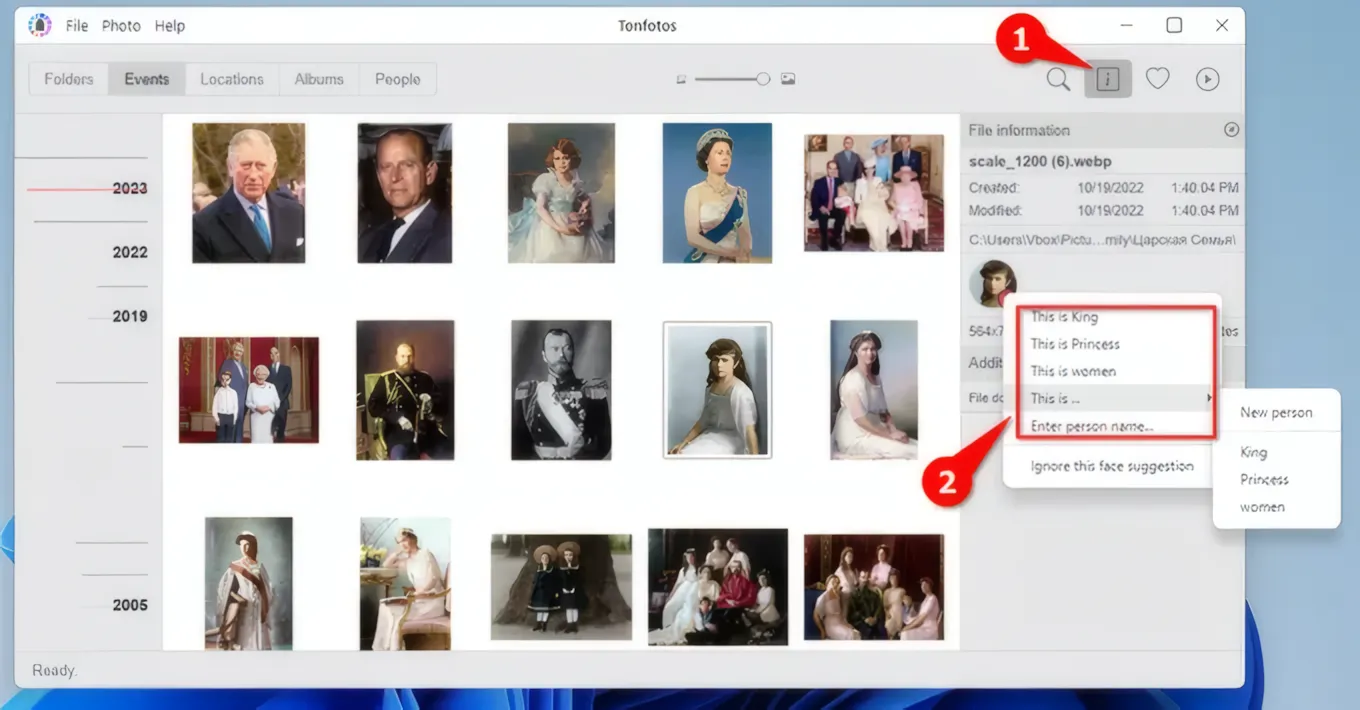
Users can enter additional information about each person and build relationships between individuals (parent, child, spouse). These relationships can then be visualized using the family tree generator.
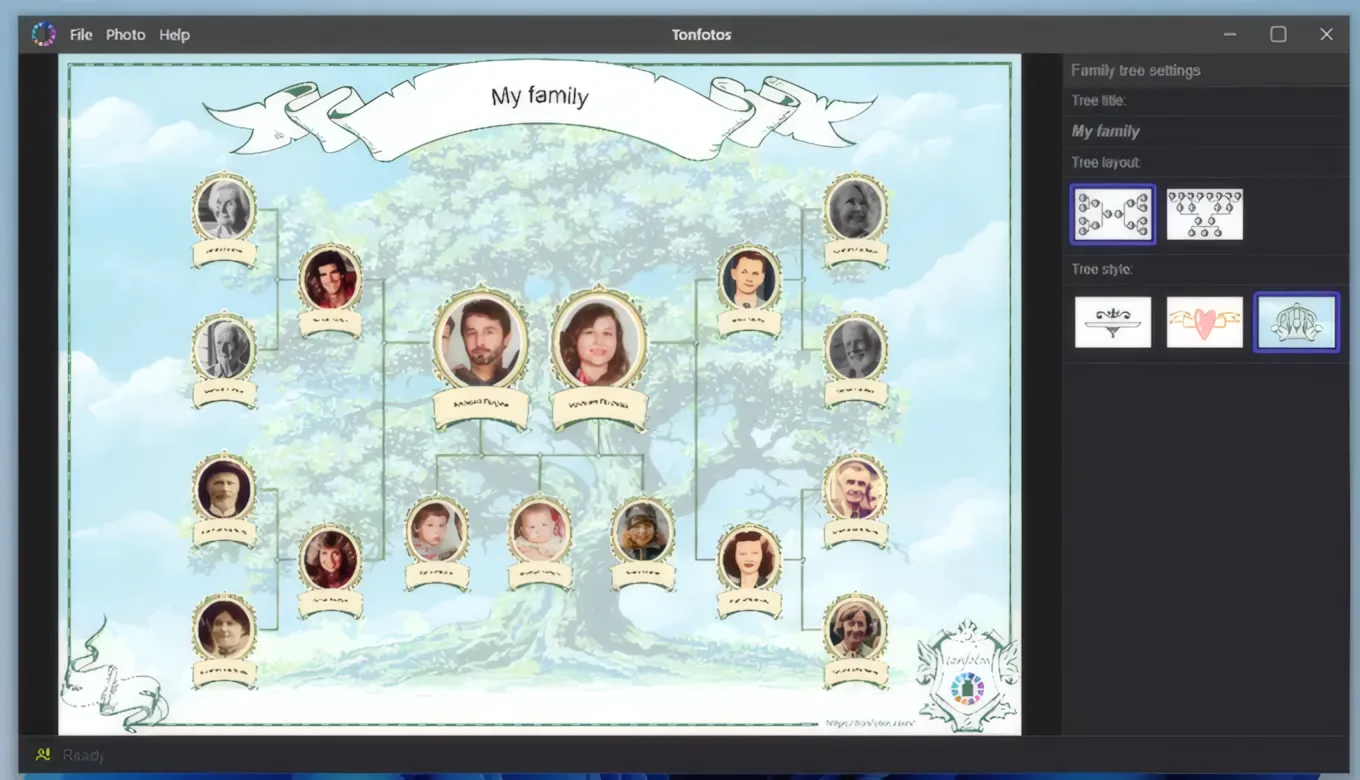
If we consider Tonfotos as an alternative to Adobe Bridge, the program is not suitable for professional production, as it lacks advanced batch conversion tools and tight integration with graphics editors. However, for 90% of the tasks of the average user (and even a photographer outside of their workflow), Tonfotos is a more modern and user-centric tool.
You can use the program for free without any functionality limitations, but you can only create up to 12 person cards. To unlock this limitation, you need to purchase a perpetual license. A personal license costs $59, while a family license (for up to 5 users) costs $159.
ACDSee Photo Studio
ACDSee Photo Studio is a powerful photo cataloger whose functionality extends far beyond image organization. It can serve not only as an alternative to Adobe Bridge, but also to Photoshop and Lightroom.
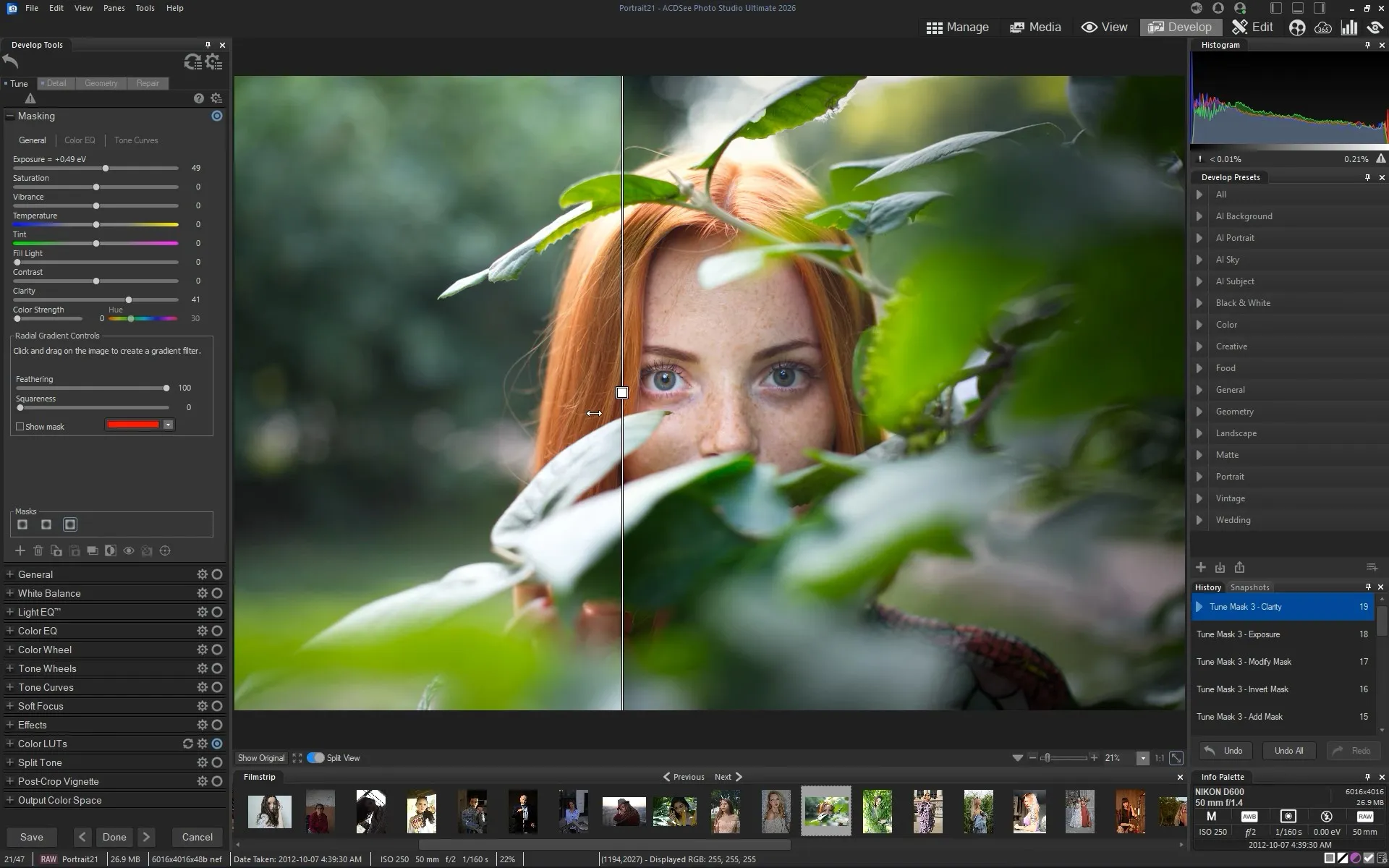
The program is divided into logical modes, which allows you to avoid confusion in the tools:
- Management. Working with the file structure. You can mark photos with ratings, color labels, add keywords, and metadata (EXIF/IPTC).
- Media. Quick access to a database of all photos on your computer without having to navigate to specific folders.
- Preview. A fast preview engine that instantly opens even the most complex files.
- Develop. Non-destructive RAW editing (similar to Lightroom's Develop module). Here you can adjust exposure, white balance, curves, and remove noise.
- Editing (Ultimate only). Work with pixels, layers, masks, and text. This section contains AI tools.
ACDSee is an excellent choice for photographers with large archives who need speed and organization. The program is available with a perpetual license, making it an attractive option for those who want to ditch their Adobe subscription while still retaining the familiar layers and RAW processing functionality in a single app.
The price of ACDSee Photo Studio depends on the available features and ranges from $159.98 to $209 without discounts.
Photo Mechanic
Adobe Bridge isn't the best solution for quickly sorting photos. It's too cumbersome and resource-intensive. Unlike Photo Mechanic, which is designed specifically for these tasks.
The program features a unique algorithm for processing RAW files. While Bridge or Lightroom spend time rendering previews, Photo Mechanic instantly extracts a full-size JPEG thumbnail embedded in the RAW file by the camera. This allows photographers to browse through thousands of images at the speed of a keystroke, without the slightest delay for loading.
Photo Mechanic can copy files from multiple memory cards simultaneously, renaming them along the way, creating backup copies to a second drive, and applying metadata templates (IPTC) directly during the import process.
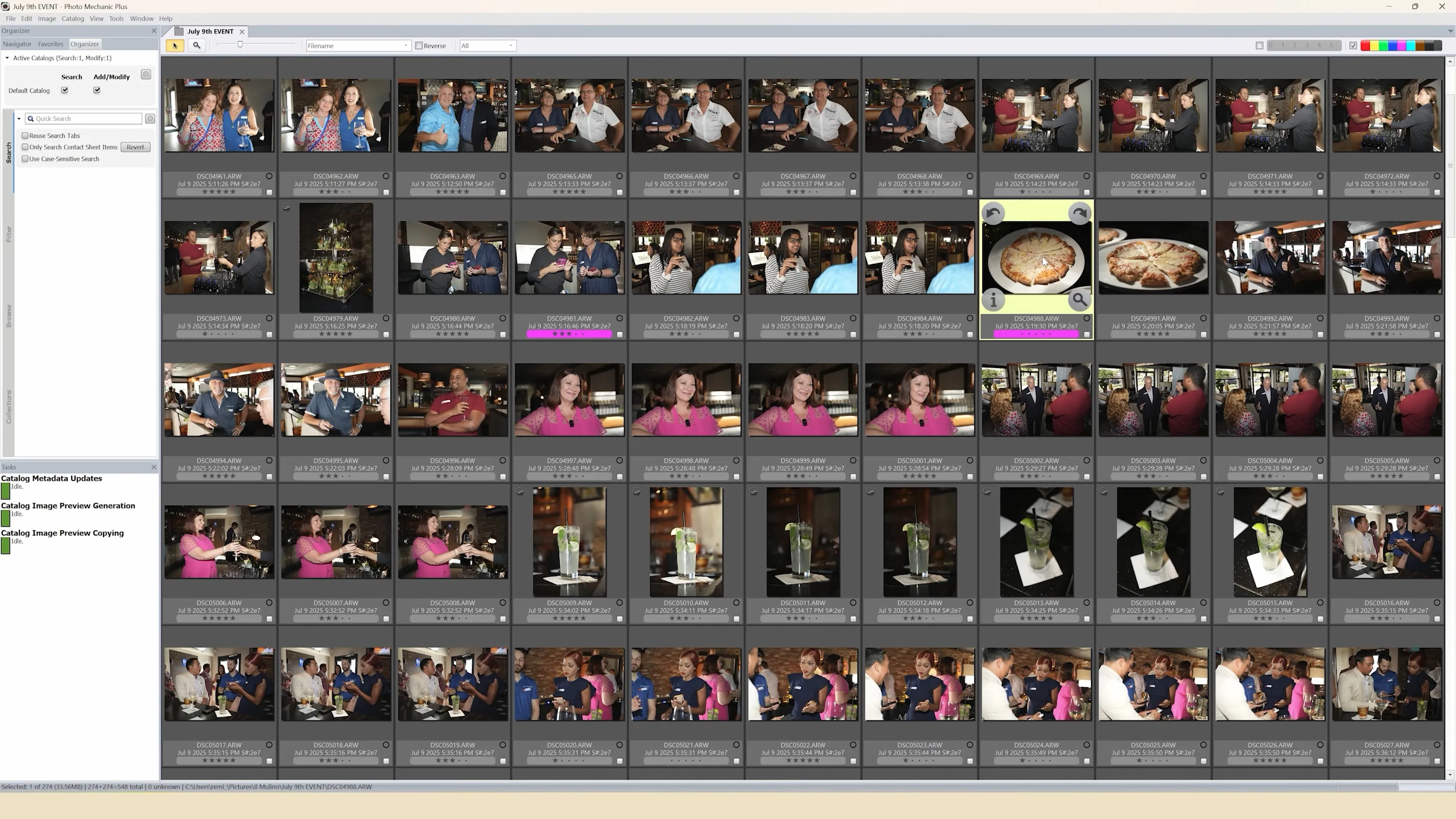
Photo Mechanic doesn't try to be "pretty" or versatile. Its interface looks conservative, reminiscent of software from the early 2000s. There are no color correction or retouching tools – the program focuses solely on content management.
By 2025–2026, Camera Bits' pricing policy had changed. Now, in addition to a perpetual license ($299–$399), a subscription model (~$15/month) has been added. Of course, for the average user shooting several hundred shots per month, the price is too high compared to the free Adobe Bridge. However, for professionals whose workflow involves processing 3,000–5,000 shots per shoot, Photo Mechanic pays for itself with the colossal time savings. This is the tool for those who need to send curated and signed footage to the editor within 10 minutes of the final whistle.
Conclusion
This article examines just a few of the existing alternatives to Adobe—solutions that are truly comparable to Creative Cloud industry standards in terms of functionality, maturity, and practical applicability. The professional software market today is much broader: in addition to the programs listed above, there are dozens of niche, specialized, and hybrid products capable of performing specific tasks just as well as, and sometimes even better than, Adobe.
In 2026, a professional user can consciously assemble their own workflow stack from alternative solutions: subscription-free, with local data processing, modern AI tools, and often higher performance. The choice depends not on the brand, but on specific tasks, budget, and workflow requirements. This is what makes today's market truly competitive.